OpenTelemetry End to End: Experiments
Six hands-on OpenTelemetry experiments, from a page reload to a backend outage, each with a prediction, real Grafana screenshots and an explanation.
This is the part where you stop reading about signals and start making them. Six experiments, each one action: reload a page, call the API with a cold and a warm cache, flood it, follow a log line to its trace, and switch the backend off. For each one you predict what will happen, do it, and compare your guess with what Grafana actually showed when this lab was run.
How to Run an Experiment
Every experiment card below has the same parts, and the same loop works for all of them:
- Read the goal, then answer the Predict first question before you touch anything. A wrong prediction teaches you more than a right one, but only if you made it.
- Do this. Most experiments have a
make exp-<id>target in the lab repo; the others are a click on the page. Run them from the lab repo with the stack up (make statusshould pass). - Wait the time on the card. Signals are batched, scraped and indexed (see Signal Timing), so looking too early is the most common reason for “nothing happened”.
Look for the signals in the table, in the dashboard or in Explore. Then check the evidence arrived from the terminal:
1
make verify-cache-miss     # or verify-<id> for any experiment
Each
verify-*target asks Grafana’s datasources whether the expected metric, log line or trace exists, retrying for up to a minute, and exits non-zero if it never shows up.- Explain what you saw, then compare with What the screenshots show and Why it happens.
The screenshots and animations are not mock-ups. They were captured on 2026-10-08 by a script that ran each experiment against the live lab, waited, ran its verify-* target, and only then took the picture. Your numbers, IDs and timestamps will differ; the shapes should not.
Experiment 1: Reload the page
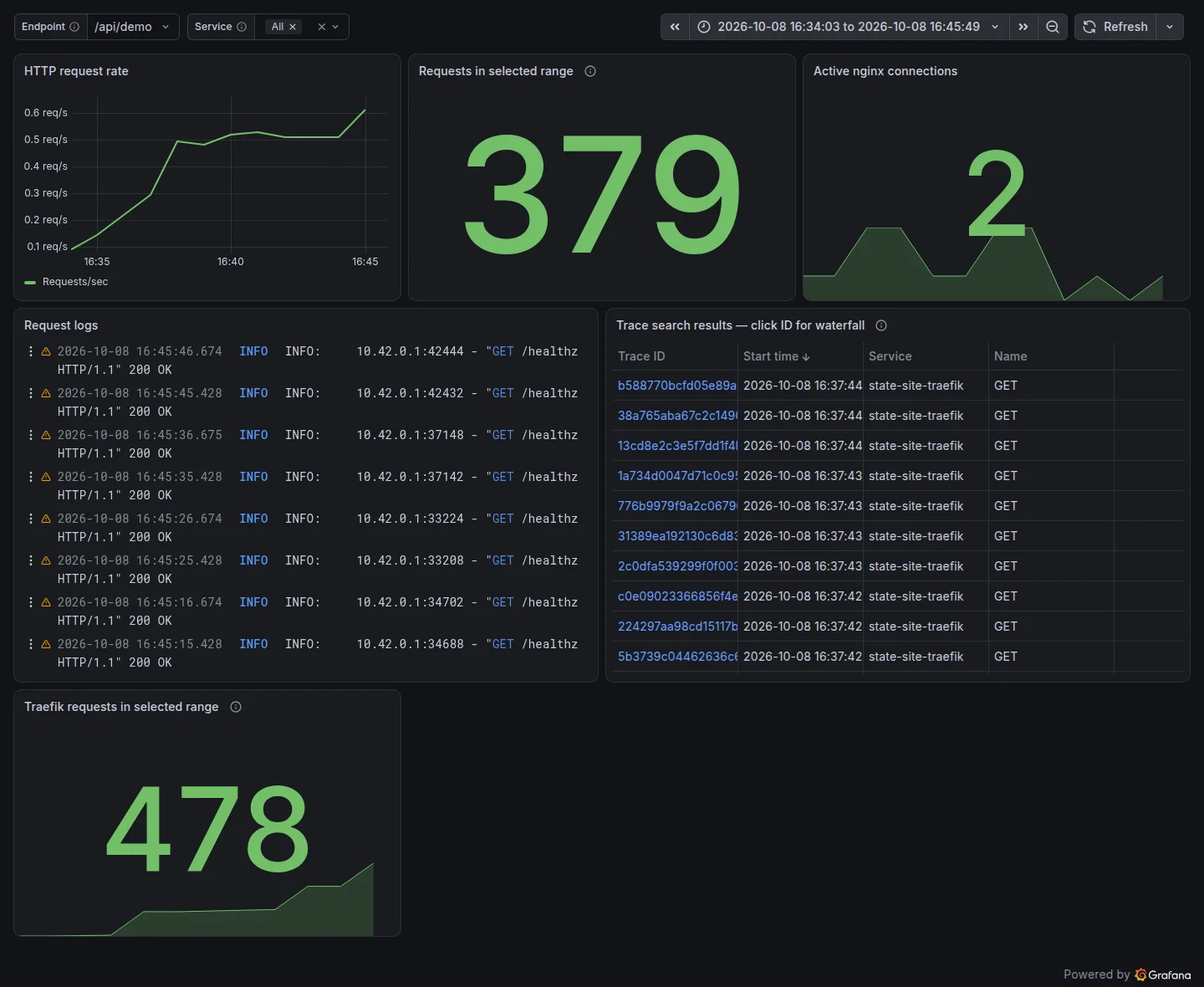
See one page load turn into nginx requests, JSON access-log lines and a browser documentLoad trace.
Open the site and reload it once.
The page needs three files. Will nginx’s request counter go up by exactly three?
| Signal | Where | Query | What you should see |
|---|---|---|---|
| metrics | Dashboard › Requests in selected range | sum(increase(nginx_http_requests_total{cluster="lab-otel", job="state-site-nginx"}[$__range])) | Rises after the next 15-second scrape, by more than the page’s files: stub_status counts every request, health probes and /v1/traces exports included. |
| logs | Dashboard › Request logs (Service = state-site-nginx) | {service_name="state-site-nginx", k8s_cluster_name="lab-otel"} | json | One JSON line per file (/, /otel.js, /favicon.ico), each with a trace_id. Probes and exports are not logged. |
| traces | Explore › Tempo | { resource.k8s.cluster.name = "lab-otel" && resource.service.name = "state-site-browser" && name = "documentLoad" } | A documentLoad trace from state-site-browser. |
What the screenshots show
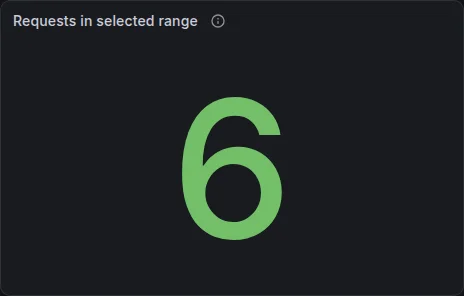
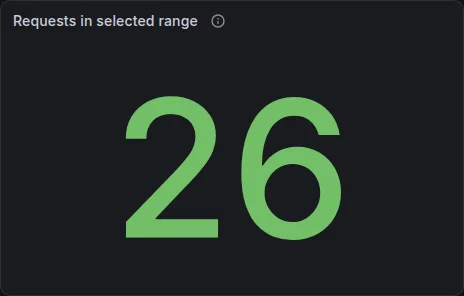
The stat went from 6 to 26. If you predicted 3 (one per file), you’re in good company, and wrong for two reasons.
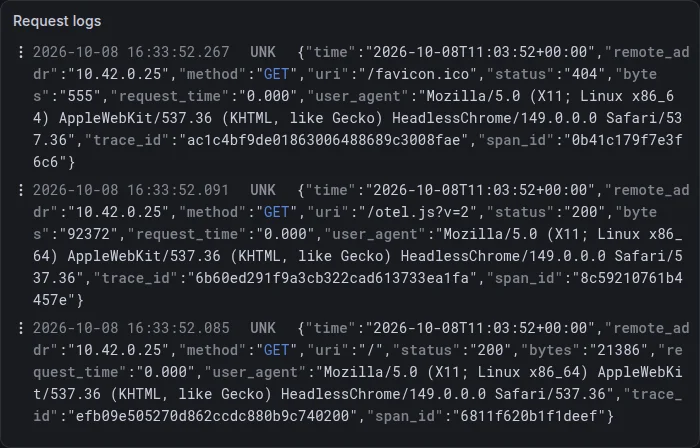
The logs panel tells the precise story: one JSON line per file the browser fetched, /, /otel.js?v=2 and /favicon.ico (a 404, since the site has none), each with its own trace_id and span_id, and a user_agent of HeadlessChrome because the capture script did the reloading. That’s three requests, as predicted.
The counter disagrees because it counts more. Querying the raw counter (sum(nginx_http_requests_total)) around the same moment shows 877 at 16:33:45 and 892 at 16:34:30: 15 requests in 45 seconds. Three were the page. Most of the rest were the kubelet’s readiness and liveness probes on /healthz (one of each every 10 seconds), and one or two were the browser exporting its spans to /v1/traces. Neither probes nor exports appear in the access log, because nginx.conf sets access_log off for them.
The stat’s own jump (+20) is bigger again for a reason that has nothing to do with nginx: increase() over the dashboard’s time range extrapolates, and this capture ran a few minutes after the LGTM pod restarted, so the series had only a few samples to extrapolate from.
Why it happens
Two signals, two transports, two definitions of “a request”:
- The metric is pulled. nginx keeps running totals in
stub_status; the exporter sidecar turns them intonginx_http_requests_total; the Collector scrapes it every 15 seconds (Part 3). It counts everything nginx answered, so it measures load, not what the user did. - The logs are tailed. nginx writes a JSON line per logged request to stdout, Kubernetes stores it under
/var/log/pods, and the Collector’sfile_logreceiver reads it and copiestrace_idinto the log record (Part 2). It records exactly the requests you chose to log.
Neither is wrong. When the two disagree, ask what each one counts before you decide something is broken.
Experiment 2: Follow a request on a cache miss
Watch one click cross four services in one trace (browser, Traefik, API, backend), and see the backend fall back to SQLite when Redis has no copy.
Empty the cache, then click Call /api/demo on the site.
make exp-cache-missWhich services will appear in the trace, and in what order? Where should the SQLite query sit?
| Signal | Where | Query | What you should see |
|---|---|---|---|
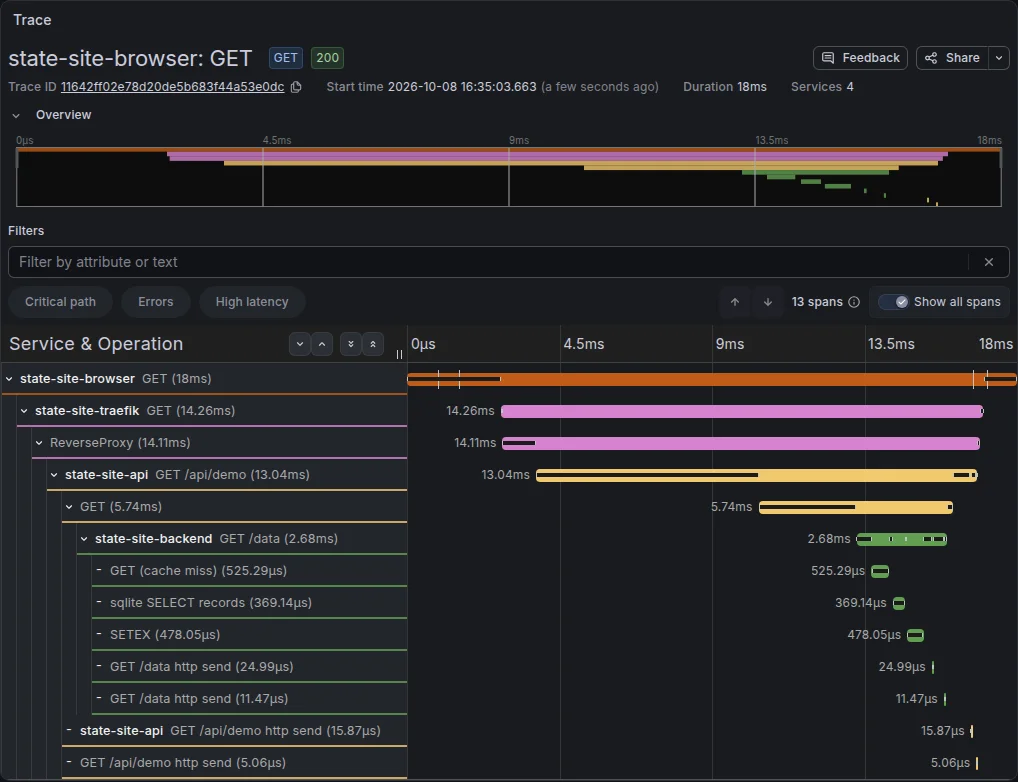
| traces | Explore › Tempo, then open the trace | { resource.k8s.cluster.name = "lab-otel" && resource.service.name = "state-site-browser" } && { name = "sqlite SELECT records" } | browser GET → Traefik → GET /api/demo → backend GET /data → GET (cache miss) → sqlite SELECT records → SETEX. |
| logs | Explore › Loki | {service_name="state-site-api", k8s_cluster_name="lab-otel"} |= "api.demo.completed" | An api.demo.completed line with cache_source database and the same trace_id. |
What the screenshots show
One trace, 11642ff0…, 18 ms end to end, 13 spans, 4 services. Read the waterfall top to bottom and the nesting is the request path:
| Span | Service | Duration | What it is |
|---|---|---|---|
GET | state-site-browser | 18 ms | The fetch in the page, from click to response |
GET, then ReverseProxy | state-site-traefik | 14.26 ms, 14.11 ms | Entering the cluster and forwarding to the API |
GET /api/demo | state-site-api | 13.04 ms | FastAPI’s server span |
GET | state-site-api | 5.74 ms | HTTPX calling the backend |
GET /data | state-site-backend | 2.68 ms | The backend’s server span |
GET (cache miss) | state-site-backend | 0.53 ms | Redis had no copy |
sqlite SELECT records | state-site-backend | 0.37 ms | The manual span around the query |
SETEX | state-site-backend | 0.48 ms | Writing the record back to Redis for 60 s |
The … http send rows are ASGI internals: the ASGI instrumentation underneath FastAPI records sending the response headers and body as tiny child spans.
If you predicted “browser → Traefik → API → backend → Redis → SQLite”, you were right about the order, and the waterfall adds what a diagram can’t: the time. About 4 of the 18 ms pass between the browser and Traefik. Over 7 of the API’s 13 ms are spent outside its backend call, and that call (5.74 ms) is itself twice as long as the backend’s own work (2.68 ms). The database is the cheapest part of this request.
Why it happens
Four different pieces of instrumentation produced this one trace, and they agree on the trace ID because each one passes it on in the traceparent header:
otel.jsstarted the trace in the browser and injectedtraceparentinto thefetch.- Traefik, configured by the
HelmChartConfig, read it and created child spans (Part 3). opentelemetry-instrumentgave the API a server span and an HTTPX client span that injectedtraceparentagain (Part 2).- The backend’s spans came from FastAPI auto-instrumentation, the Redis client instrumented by hand with a response hook (hence
GET (cache miss)), and a manual span around SQLite.
Each service then exported its spans separately, at different moments, to the Collector. Tempo assembled them by trace ID. That’s also why a trace can briefly look incomplete: some spans have arrived and others haven’t yet.
Experiment 3: Compare a cache hit
Run the same request with a warm cache and spot what disappears from the trace.
Warm the cache, then click Call /api/demo again within 60 seconds.
make exp-cache-hitWhich spans will be missing compared with the miss? Will the request be noticeably faster?
| Signal | Where | Query | What you should see |
|---|---|---|---|
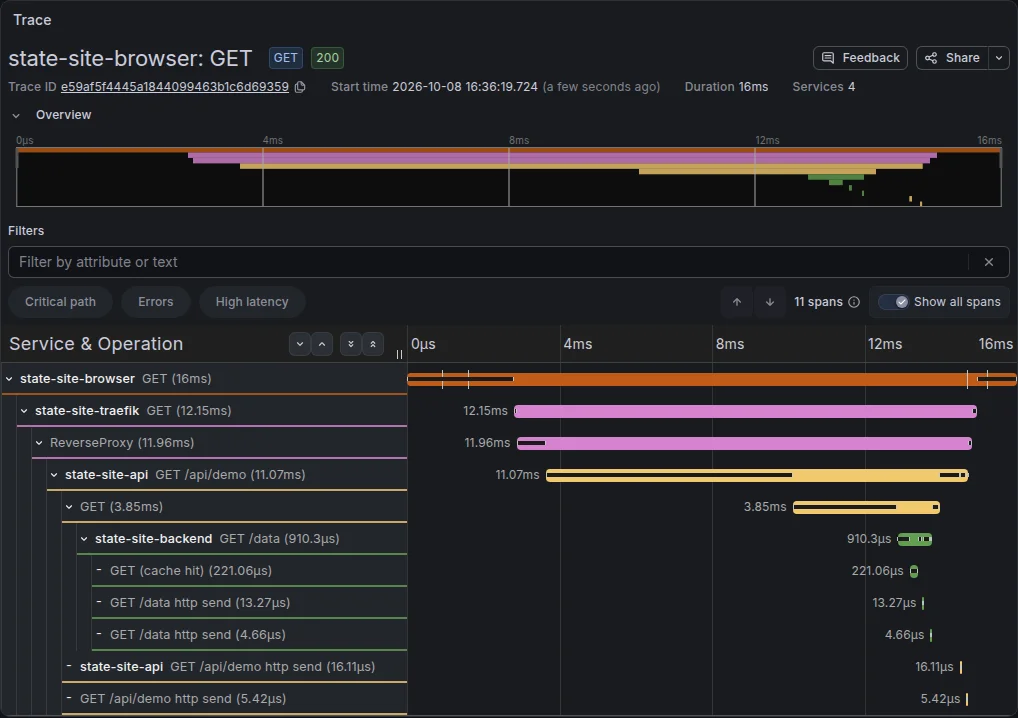
| traces | Explore › Tempo, then open the trace | { resource.k8s.cluster.name = "lab-otel" && resource.service.name = "state-site-browser" } && { name = "GET (cache hit)" } | GET (cache hit) and no sqlite SELECT records or SETEX spans. |
What the screenshots show
Trace e59af5f4…: 16 ms, 11 spans, still 4 services. Put it next to the miss from experiment 2:
| Cache miss (exp. 2) | Cache hit (exp. 3) | |
|---|---|---|
| Spans | 13 | 11 |
| Redis | GET (cache miss) 0.53 ms | GET (cache hit) 0.22 ms |
sqlite SELECT records | 0.37 ms | not there |
SETEX | 0.48 ms | not there |
Backend GET /data | 2.68 ms | 0.91 ms |
| API’s call to the backend | 5.74 ms | 3.85 ms |
| Whole request (browser span) | 18 ms | 16 ms |
The two missing spans are exactly the two operations a cache hit skips. The backend got about three times faster, but the user-visible request only went from 18 to 16 ms, because the backend was never where the time went.
Why it happens
make exp-cache-hit called the API once, so the backend wrote the record to Redis with a 60-second TTL; your click came seconds later and found it. In main.py the hit path returns before the SQLite block is ever reached, so its span is never created. Absence is information: a trace’s shape tells you which code path ran, before you read a single attribute.
The response hook from Part 2 is what makes this readable at a glance. Without it, both Redis spans would just say GET, and you’d have to open each one to find app.cache.result. With it, you can even search for the path directly: { name = "GET (cache hit)" }.
The modest end-to-end gain is the real lesson. The cache saved about 2 ms of an 18 ms request; the other 16 are spent in the browser, the gateway and the API. Without a trace you’d be guessing where to optimise.
Experiment 4: Send a burst of traffic
See Traefik’s request metrics climb while 150 requests arrive, and how pushed metrics differ from scraped ones.
Send 100 API calls and 50 page loads from the terminal.
make exp-trafficWill the browser service show up in the traces for this burst? (curl is not a browser.)
| Signal | Where | Query | What you should see |
|---|---|---|---|

| metrics | Dashboard › Traefik requests in selected range | sum(increase(traefik_entrypoint_requests_total{cluster="lab-otel", job="state-site-traefik"}[$__range])) | Jumps by roughly 150 once Traefik’s next OTLP metrics push lands (anywhere from about 15 to 60 seconds). |
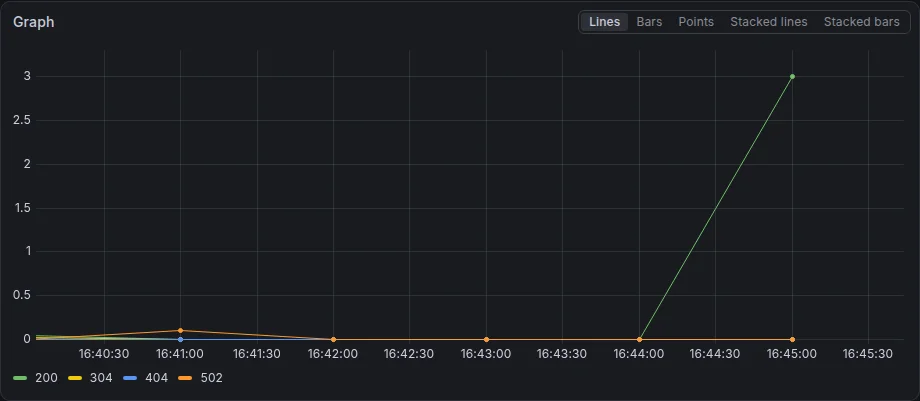
| metrics | Explore › Mimir | sum by (code) (rate(traefik_entrypoint_requests_total{cluster="lab-otel", job="state-site-traefik", method="GET"}[1m])) | A spike in the 200 series during the burst. |
What the screenshots show
The animation is the interesting one. Traefik’s counter read 325 in the first frame and was still 327 half a minute later, although all 150 requests had long been sent. Somewhere between the 30- and 60-second frames it jumped to 474, and it ended at 477: about 150 more, the burst plus a few probes and exports.
The rate graph says the same thing in requests per second: flat near zero for four minutes, then the 200 series spikes to about 3 requests/second at 16:45. There’s also a tiny orange 502 bump at 16:41, left over from an earlier run of experiment 6, which is how you’d spot a previous incident on a real dashboard.
And the prediction: no, the browser doesn’t appear. The trace table on the dashboard after the burst lists only state-site-traefik roots. curl has no OpenTelemetry SDK, so those traces start at the gateway.
Why it happens
Traefik’s request counter is pushed: Traefik aggregates in memory and sends OTLP metrics to the Collector on its own interval, and the Collector batches them on to Prometheus (Part 3). Until the next push lands, the dashboard can’t know anything happened. During the runs for this lab that delay varied from about 14 seconds to almost a minute, which is why the card says to wait 90 seconds.
The panel is increase() over the selected range, so it climbs in steps, one per push, rather than smoothly. The rate graph uses rate(...[1m]) per status code, which turns the same counter into “requests per second”, the number you’d actually alert on.
The lesson for real systems: metrics are cheap and always on, but they’re aggregates that arrive in batches. For “what happened to this one request”, you need a trace; for “how much, how often”, a metric.
Experiment 5: Jump from a log line to its trace
Use the trace ID in the API’s log line to find the exact trace, the way the lab page does it.
Click Call /api/demo and watch the This request in Grafana panel fill in.
What links a log line in Loki to a trace in Tempo? Nothing in Loki knows about Tempo.
| Signal | Where | Query | What you should see |
|---|---|---|---|
| logs | Lab page › This request in Grafana › Logs | {service_name="state-site-api", k8s_cluster_name="lab-otel"} | json | trace_id="<trace id>" | The api.demo.completed line for this click, with its trace_id. |
| traces | Lab page › This request in Grafana › Trace | The spans of the trace with that same ID. |
What the screenshots show
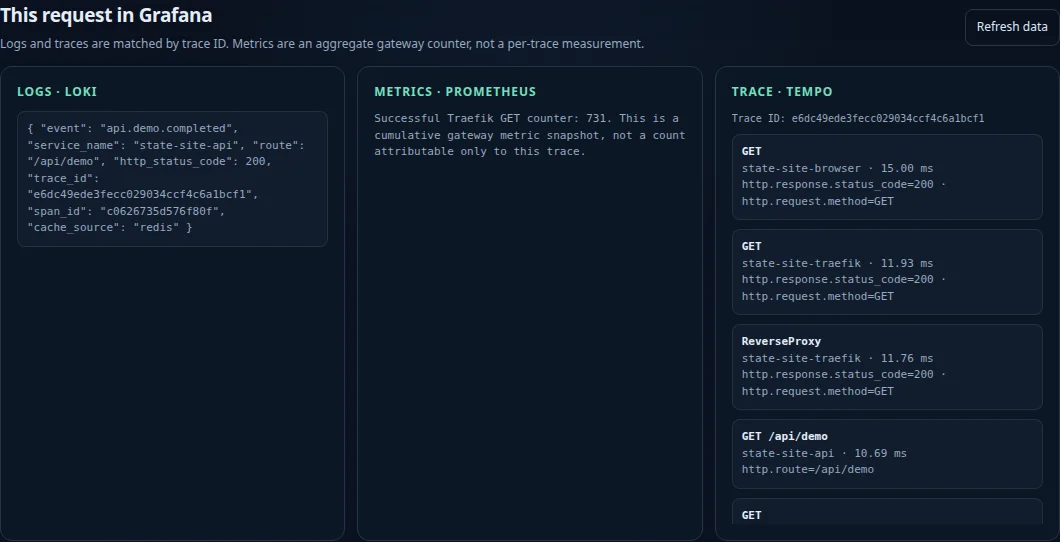
The lab page’s own This request in Grafana panel shows the whole correlation on one screen: the API’s log line with "trace_id": "e6dc49ede3fecc029034ccf4c6a1bcf1" and "cache_source": "redis", and next to it the spans of trace e6dc49ed…: the browser’s GET (15 ms), Traefik’s GET and ReverseProxy, the API’s GET /api/demo (10.69 ms) and so on down.
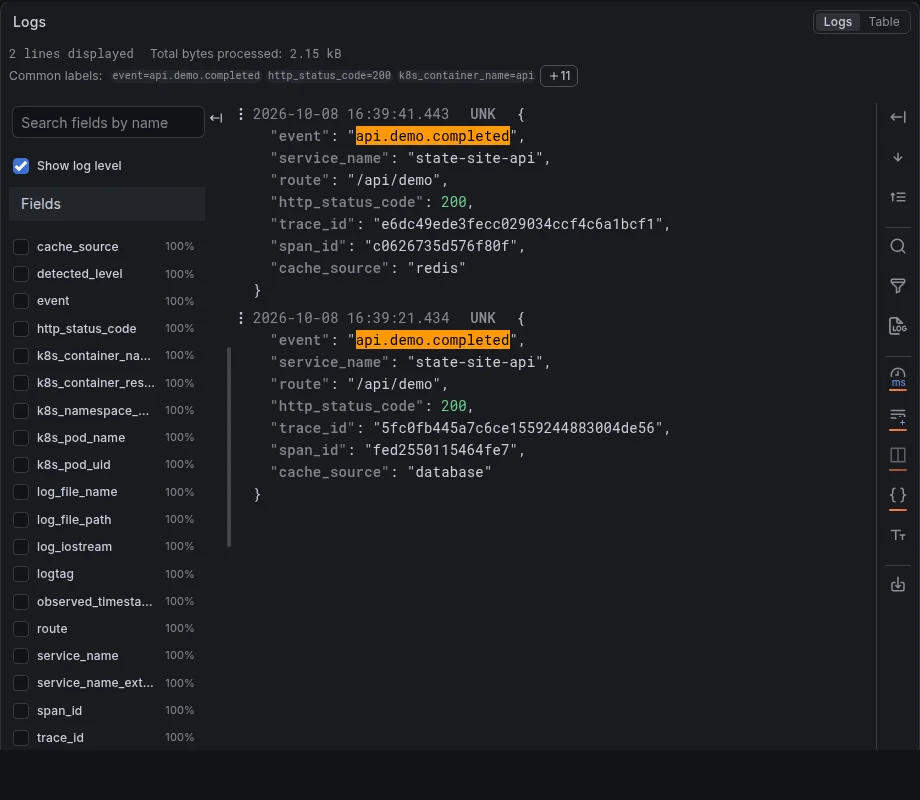
Explore shows the same lines from Loki’s side: two api.demo.completed events, one at 16:39:21 with cache_source: "database" (the experiment’s click, after the cache had expired) and one at 16:39:41 with cache_source: "redis" (the second click, made by the capture script for the screenshot). Each has its own trace_id.
The prediction question has an answer you can now say precisely: nothing in Loki knows about Tempo. The only link is a 32-character string that both happen to contain.
Why it happens
The API reads the trace ID from the current span and prints it into its JSON line (Part 2). That line goes to stdout, the Collector tails it, and the json_parser’s trace block copies trace_id into the log record’s own trace context before it reaches Loki (Part 3).
The page does the jump itself. After the click it queries Loki for {service_name="state-site-api", k8s_cluster_name="lab-otel"} | json | trace_id="<id>", then fetches the trace from Tempo by the same ID, through nginx’s read-only /grafana-api/ proxy. It has to retry, because the log line and the spans arrive separately; the screenshot needed a 20-second wait and a Refresh data click before the backend’s spans were all there.
That pattern, log carries trace ID, tool looks it up, is how every serious observability stack links logs and traces. Grafana can do it natively with a derived field on the Loki datasource; this lab does it by hand so you can see that there’s no magic in it.
Experiment 6: Take the backend down
Stop the backend, watch errors show up in all three signals, then watch it recover.
Scale the backend to zero, call the API five times, scale it back and call it five more times.
make exp-outageWhat status will the browser get, and which span will hold the real cause of the failure?
| Signal | Where | Query | What you should see |
|---|---|---|---|
| traces | Explore › Tempo, then open the trace | { resource.k8s.cluster.name = "lab-otel" && status = error && resource.service.name = "state-site-api" } | Error spans from Traefik down to the API’s outgoing GET, which carries ConnectError: All connection attempts failed. |
| logs | Explore › Loki | {service_name="state-site-api", k8s_cluster_name="lab-otel"} |= "GET /api/demo" | uvicorn access lines with 502 Bad Gateway during the outage, then 200 OK again after recovery. |
| metrics | Explore › Mimir | sum by (code) (increase(traefik_entrypoint_requests_total{cluster="lab-otel", job="state-site-traefik", method="GET"}[1m])) | A 502 series appears next to the 200 series. |
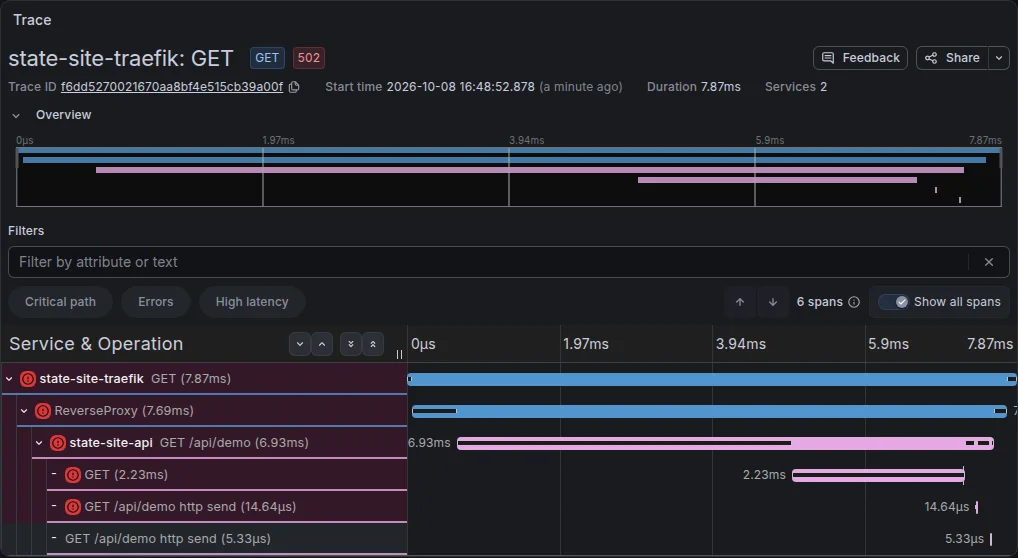
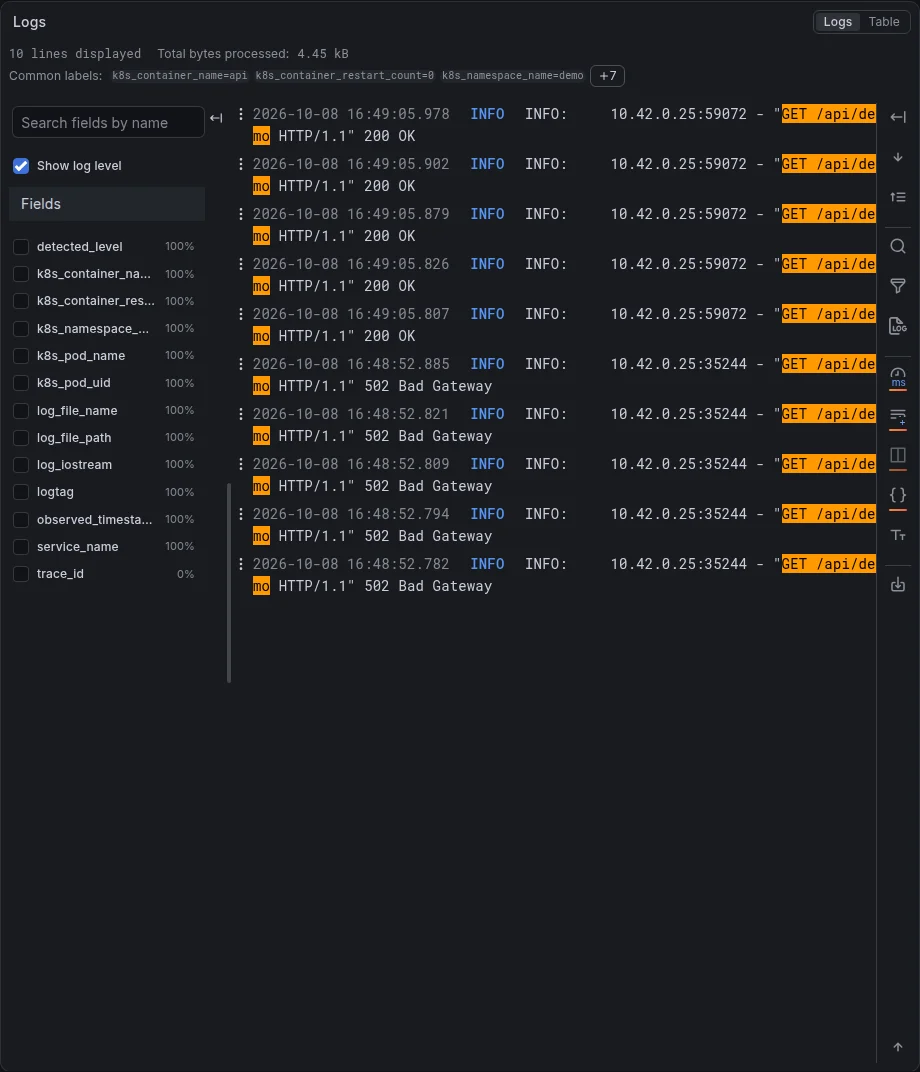
What the screenshots show
All three signals record the outage, each in its own way:
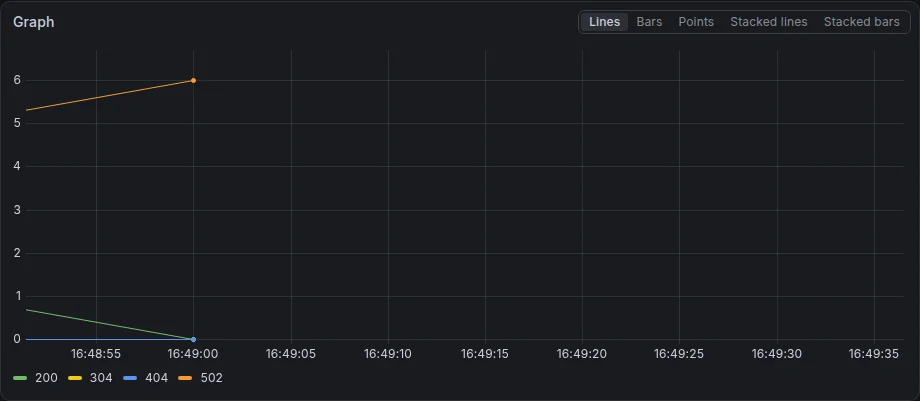
- Metrics: Traefik’s requests per minute by status code show the
502series at about 6 per minute with200at zero (increase()extrapolates, so five requests read as about six). - Trace:
f6dd5270…is red from top to bottom, 7.87 ms, 6 spans, only 2 services: Traefik and the API. The backend isn’t in it at all. The API’s outgoingGET(2.23 ms) is where it failed, with status messageConnectError: All connection attempts failedand anexceptionevent of typehttpx.ConnectError. - Logs: five
"GET /api/demo HTTP/1.1" 502 Bad Gatewaylines at 16:48:52, then five200 OKat 16:49:05 once the backend was back.
If you predicted that the browser would see a 502 and the cause would be in the API’s client span, you were right. The interesting part is what’s missing: a failure to reach a service leaves no spans from that service, because there was no process there to create them.
Why it happens
Scaling the Deployment to 0 removes the backend pod, so the backend Service has no endpoints and connections to it are refused. HTTPX raises ConnectError, its instrumentation records the exception on the client span, and main.py turns it into HTTPException(status_code=502) (Part 2). FastAPI’s server span and then Traefik’s spans inherit the error status as the 502 travels back up.
- A normal request: make exp-outage sends five GET /api/demo requests right after scaling the backend Deployment to 0.
- Traefik forwards it: Nothing is wrong at the edge yet. Traefik starts a gateway span and routes /api to the API Service.
- The API is healthy: The API pod is up, so its server span starts as usual and it calls http://backend:8000/data.
- Nobody answers: The backend Service has no endpoints. HTTPX raises ConnectError and its client span records the exception.
- The API turns it into a 502: main.py catches httpx.HTTPError and raises HTTPException(502). The server span is marked as an error.
- The 502 reaches the caller: Traefik passes the 502 back and marks its own spans as errors too, so the trace is red from top to bottom.
- Three signals, three views: Tempo holds the error spans and the exception, Loki the uvicorn 502 access line, Prometheus a code=502 count from Traefik.
Failures aren’t always this tidy. In an earlier run of the same experiment while building this lab, the first call after the scale-down waited the API’s full 5-second timeout (ConnectTimeout) before failing, and the next four failed instantly. After scaling back up, the first call made right after kubectl rollout status reported the backend ready also timed out. The likely cause is the short window in which the cluster’s networking still routes to an old pod address, or doesn’t yet route to the new one. A trace shows you which kind of failure you got (2 ms or 5 s), which a 502 count alone never would.
Check Your Understanding
Experiment 1's counter rose by more than the page's three files. Name two things nginx counted that the access log didn't show.
The kubelet’s /healthz readiness and liveness probes, and the browser’s span exports to /v1/traces. Both locations have access_log off, but stub_status counts every request.
How could you tell a cache hit from a miss without opening any span's attributes?
By the trace’s shape and span names: a miss has GET (cache miss), sqlite SELECT records and SETEX; a hit has only GET (cache hit). You can search for either directly with TraceQL.
Why did Traefik's counter stay flat for half a minute after the burst?
Traefik pushes its metrics on its own interval, and the Collector batches them on. Nothing reaches Prometheus until the next push, so the dashboard shows the burst in one step, late.
During the outage, why are there no backend spans in the failed trace?
The backend pod didn’t exist, so no process received the request and nothing could create a span. The evidence is on the caller’s side: the API’s HTTPX client span holds the ConnectError.