DGX Spark to Azure Private Endpoint: Experiments
Perform an action, predict the signal, then check the dashboard and explain what changed (DGX Spark to Azure Private Endpoint lab).
Six experiments, one change each, in the order you’d build the connection for real: no tunnel, tunnel without DNS, split DNS, the missing zones, then switching the VM off and on again to save money. For each one you predict first, make the change, and read the result off the dashboard. By the end you’ll be able to tell a routing problem, a DNS problem and a cache from each other in seconds.
How to Run an Experiment
Each experiment card below gives the goal, the command, a question to answer before you run it, how long to wait, and what to look for on which panel. The loop is always the same:
- Read the goal and answer the prediction question.
- Run the
make exp-<id>target from the lab repo. - Wait the stated time: the probe checks every 10 seconds and exports every 5 (Signal Timing).
- Look at the panels named in the card, then compare with your prediction.
Experiments 2 and 3 change the DGX’s network and need sudo, so make exp-tunnel-up and make exp-split-dns ask for your password. Experiments 4 to 6 change only Azure. make verify-<id> asks Grafana whether the expected signal arrived, and exits non-zero if it didn’t.
Every screenshot below is from a real run on 2026-10-10 against account pelab-3d07e659 in East US, captured by the lab’s screenshot script after the experiment’s verify step passed. Experiments 2 and 3 come from one run, 4 to 6 from the run after it. In between I fixed two things: a systemd ordering cycle that kept WireGuard from starting after a VM restart (Experiment 6), and the dashboard’s timeline panels, which drew grey bars instead of states (Part 3).
Experiment 1: Call the account over the internet
See what the DGX gets today: all three names resolve to a public IP and the account’s firewall answers 403.
With no tunnel up, restart the probe so it starts from a clean slate.
make exp-baselinePublic network access is disabled on the account. Will DNS fail, will the TCP connection fail, or will something else stop the call?
| Signal | Where | Query | What you should see |
|---|---|---|---|
| metrics | Dashboard › Name resolves to, HTTP status | max by (host) (pe_probe_dns_private) | PUBLIC for all three names, and HTTP 403 for all three. |
| logs | Dashboard › Probe log | {service_name="pe-probe"} | host=~".+" | A CNAME chain through privatelink.* that still ends at a public IP, then HTTP 403. |
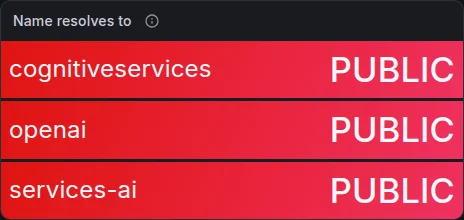
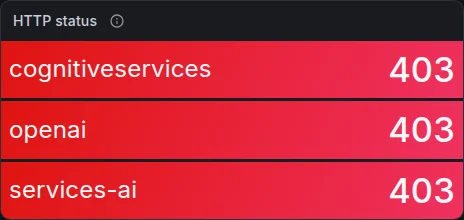
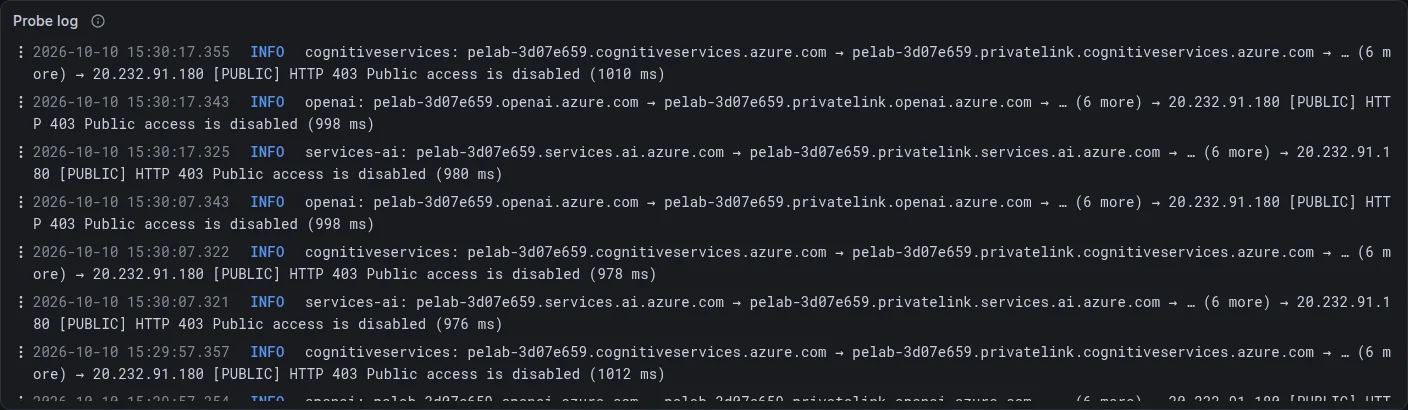
What the screenshots show
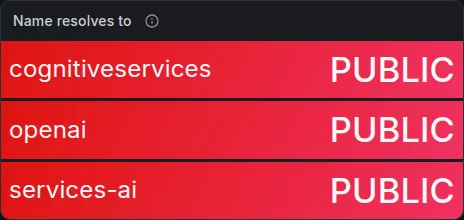
Your prediction might have been “DNS fails” or “the connection times out”. Neither happens. All three names resolve, all three resolve to the same public address, 20.232.91.180, and all three calls get an HTTP answer: 403, with the message Public access is disabled.
The log line is the interesting part. The very first hop after the public name is already pelab-3d07e659.privatelink.cognitiveservices.azure.com (and the same for openai and services.ai), followed by six more CNAMEs (Traffic Manager, API Management, a regional host) before the address. Each check takes about a second, mostly because the DGX is about 211 ms from East US and an HTTPS request needs several round trips.
Why it happens
Creating a private endpoint changes the public DNS too: the account’s public name becomes a CNAME to its privatelink name. That’s how Azure lets one name work everywhere. A resolver that can see a linked privatelink zone answers the second hop with the private IP; every other resolver keeps following the public CNAME chain to the shared front end.
Your home router is one of the “every other” resolvers, so the DGX connects over the internet to the regional front end. That front end accepts the TLS connection and the HTTP request, checks the account’s network rules, sees publicNetworkAccess: Disabled (Part 3), and answers 403. So the block is an HTTP-level decision by the service, not a network failure. An SDK reports it as an authorization error, which sends people looking at keys and roles instead of DNS.
Experiment 2: Bring up the tunnel, change nothing else
Prove that routing alone is not enough: the private endpoint’s IP answers over WireGuard, but the names still resolve to the public IP.
Bring up wg0 (tunnel only, no DNS changes) in your terminal.
make exp-tunnel-upThe DGX can now reach 10.60.0.0/16. Will the HTTP status for the cognitiveservices name change?
| Signal | Where | Query | What you should see |
|---|---|---|---|
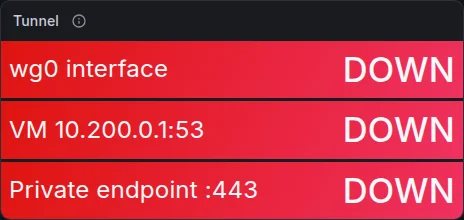
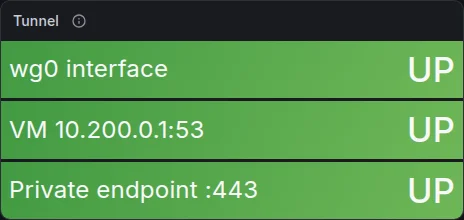
| metrics | Dashboard › Tunnel | max(pe_probe_pe_tcp_up) | wg0 interface, VM 10.200.0.1:53 and Private endpoint :443 all go from DOWN to UP. |
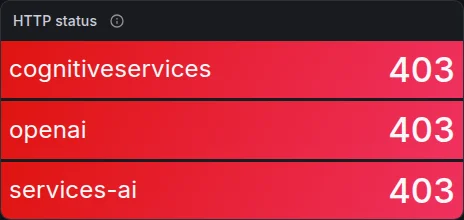
| metrics | Dashboard › Name resolves to | max by (host) (pe_probe_dns_private) | Still PUBLIC for all three names, so HTTP stays 403. |
What the screenshots show
The Tunnel panel goes from three red DOWNs to three green UPs: wg0 interface, VM 10.200.0.1:53 and Private endpoint :443. The DGX can now open a TCP connection to the private endpoint’s IP. The HTTP status panel doesn’t change at all: 403 for all three names, exactly as before.
If you predicted the cognitiveservices status would change, this is the experiment that should stick. The network path to the endpoint exists, and nothing uses it.
Why it happens
wg-quick up wg0 added two routes, 10.200.0.1/32 and 10.60.0.0/16, both via wg0. The probe’s three DNS-free checks use those addresses directly, so they pass. Packets to 10.60.1.4 cross the tunnel, the VM forwards them and MASQUERADE rewrites their source to 10.60.2.4 (Part 3).
The calls themselves still start with a DNS lookup, and that still goes to the home router, which still answers 20.232.91.180. A public address isn’t in 10.60.0.0/16, so the request takes the default route out of your home connection, exactly as in experiment 1. Routes decide where packets for an address go. DNS decides which address you ask for, and only DNS can move the SDK onto the private path. You can prove it with curl --resolve, which skips DNS and gets 200 (Part 4).
Experiment 3: Send the Azure AI names through the tunnel
Turn on split DNS and watch the cognitiveservices name flip to the private endpoint’s IP and the call succeed, while the openai name stays public.
Point the three Azure AI domains at dnsmasq on the VM (resolvectl, in your terminal).
make exp-split-dnsAll three domains now go to the VM’s dnsmasq. Will all three names turn PRIVATE?
| Signal | Where | Query | What you should see |
|---|---|---|---|
| metrics | Dashboard › Name resolves to, HTTP status | max by (host) (pe_probe_ok) | cognitiveservices: PRIVATE and 200. openai and services-ai: still PUBLIC and 403. |
| logs | Dashboard › Probe log | {service_name="pe-probe"} |= "[PRIVATE]" | cognitiveservices: … privatelink.cognitiveservices.azure.com → 10.60.1.4 [PRIVATE] HTTP 200. |
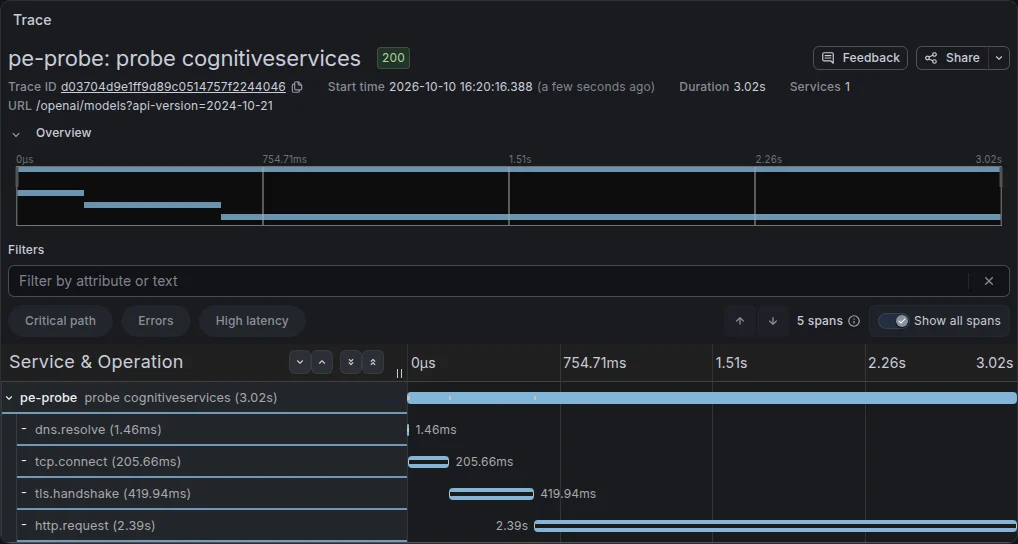
| traces | Explore › Tempo, then open the trace | { resource.service.name = "pe-probe" && name = "probe cognitiveservices" && span.net.path = "private" } | dns.resolve, tcp.connect, tls.handshake and http.request spans, with the time each one took over the tunnel. |
What the screenshots show
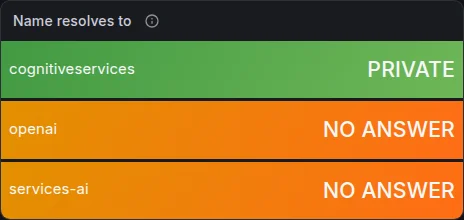
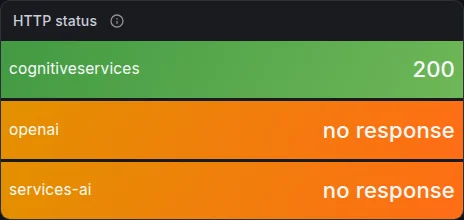
The Name resolves to panel flips cognitiveservices to green PRIVATE, and HTTP status shows 200 for it. The other two names didn’t turn private. In this run they show NO ANSWER and no response. In my first run of this same step they stayed PUBLIC with 403, which is what you’ll see on a fresh lab. The difference is my fault: just before this run I had deleted the openai and services.ai zones to reset experiment 4, and for a few minutes Azure DNS still treated privatelink.openai.azure.com as linked but empty. It answered “name exists, no address” (NoAnswer in the probe log) instead of falling back to the public answer. That’s a gotcha worth knowing on its own: a linked private zone that lacks your record doesn’t fall back to public DNS. The name just stops resolving.
The trace waterfall (trace d03704d9…) is one private call to the cognitiveservices name: dns.resolve 1.46 ms (answered from systemd-resolved’s cache), tcp.connect 205.66 ms, tls.handshake 419.94 ms and http.request 2.39 s, 3.02 s in total. The connect time is one round trip through the tunnel to East US. TLS takes two, and the request includes the service listing its models. In the first run, with an empty cache, the same call spent 229.7 ms in DNS: one more round trip, to dnsmasq on the VM and back.
Why it happens
make exp-split-dns ran three resolvectl commands on wg0: DNS server 10.200.0.1, the routing domains ~cognitiveservices.azure.com ~openai.azure.com ~services.ai.azure.com, and default-route false. From then on, systemd-resolved sends any name under those three domains through the tunnel to dnsmasq, which asks Azure DNS from inside the VNet. Every other name still goes to the home router.
So all three names now reach Azure DNS, but only one gets a private answer. Azure DNS returns a private IP only for privatelink names that have a linked zone with a record. The lab started with just privatelink.cognitiveservices.azure.com (Part 3). The OpenAI SDK calls <account>.openai.azure.com, so in a real app this is the state where “the private endpoint works” in a portal test and the code still gets 403. Split DNS is per domain; private DNS zones are per name.
Experiment 4: Add the missing openai and services.ai zones
Fix the mistake from the brief: give the private endpoint’s zone group the privatelink.openai and privatelink.services.ai zones, and time how long the DNS answers take to change.
Add the two zones, link them to the VNet and add them to the endpoint’s zone group (az CLI).
make exp-openai-zoneThe zones are created in Azure in about a minute. Will the DGX see the private answer as soon as the command returns?
| Signal | Where | Query | What you should see |
|---|---|---|---|
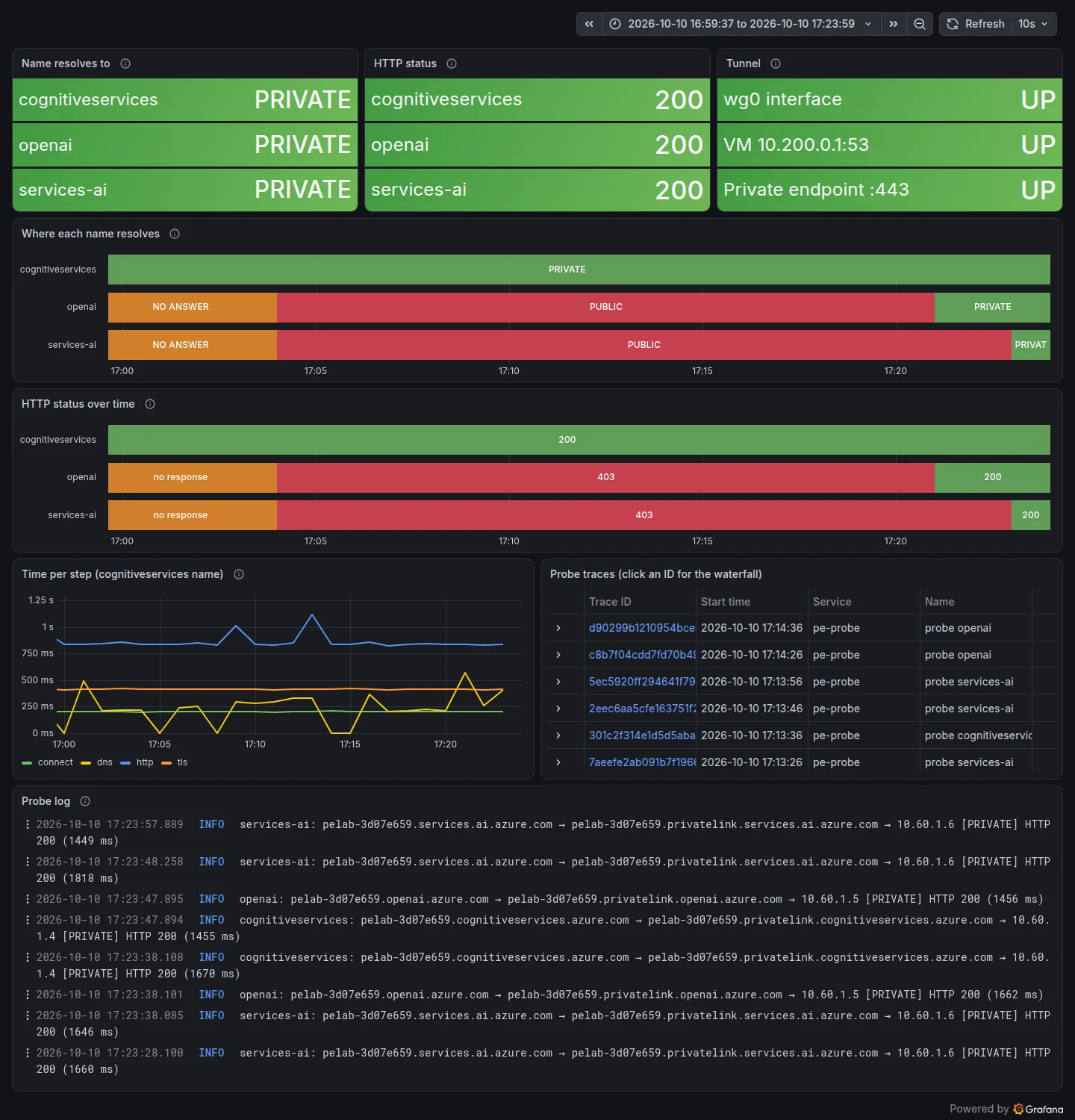
| metrics | Dashboard › Where each name resolves | max by (host) (pe_probe_dns_private) | openai and services-ai change from PUBLIC to PRIVATE, but only once the cached public answers expire, minutes after the command finished. |
| logs | Dashboard › Probe log | {service_name="pe-probe"} |= "openai: " |= "[PRIVATE]" | openai: … privatelink.openai.azure.com → 10.60.1.4 [PRIVATE] HTTP 200. |

What the screenshots show
The fix itself is quick. make exp-openai-zone created both zones, linked them and added them to the endpoint’s zone group in 2 minutes 43 seconds, finishing at about 17:08:20. Then the target asked each resolver on the path what it had for pelab-3d07e659.openai.azure.com:
1
2
3
4
5
  azure dns    pelab-3d07e659.openai.azure.com. 900 IN	CNAME	pelab-3d07e659.privatelink.openai.azure.com.
  azure dns    pelab-3d07e659.privatelink.openai.azure.com. 10	IN A 10.60.1.5
  vm dnsmasq   pelab-3d07e659.openai.azure.com. 740 IN	CNAME	pelab-3d07e659.privatelink.openai.azure.com.
  dgx resolved pelab-3d07e659.openai.azure.com. 739 IN	CNAME	pelab-3d07e659.privatelink.openai.azure.com.
  dgx resolved pelab-3d07e659.privatelink.openai.azure.com. 790 IN CNAME eastus.api.cognitive.microsoft.com.
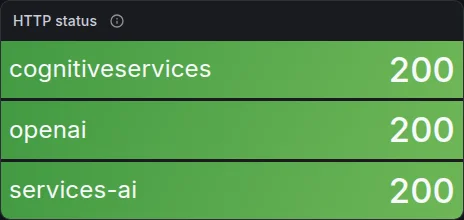
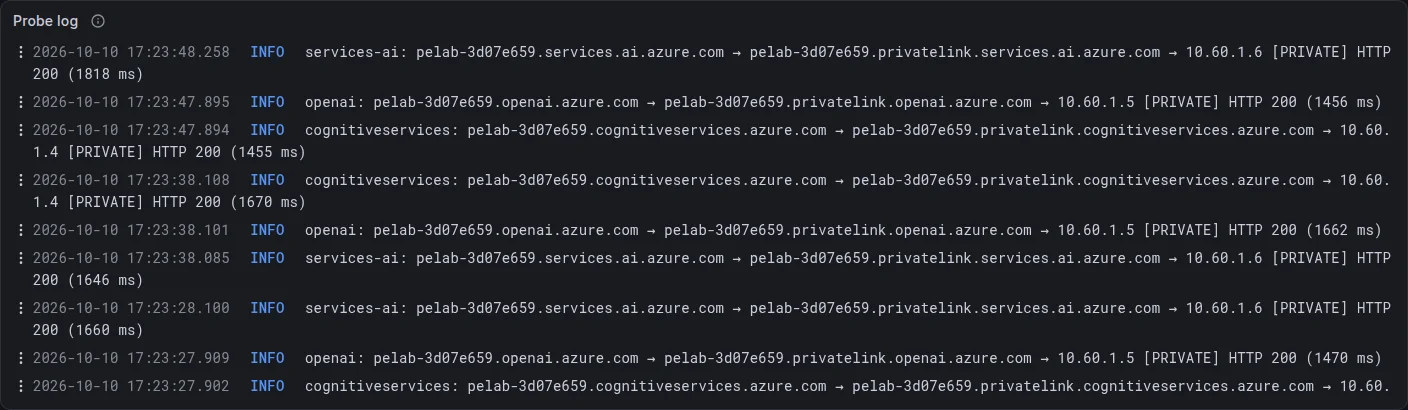
Azure DNS already had the right answer: the A record 10.60.1.5. dnsmasq on the VM and resolved on the DGX still held the old public chain, with 740 and 790 seconds left. The timelapse shows the consequence. The openai row stays red PUBLIC until about 17:21 and services-ai until about 17:23, then both turn green PRIVATE. HTTP goes from 403 to 200 at the same moments, and the probe log ends with all three names going through their own privatelink zone to 10.60.1.4, .5 and .6 with HTTP 200.
So if you predicted “as soon as the command returns”, the answer is no: in this run it took about 13 minutes after the command returned.
The orange stretches at the start of the timeline aren’t part of the experiment. The panel looks back 20 minutes, which includes the VM outage from my first attempt at experiment 6 (all three names) and my reset of the two zones before re-running this experiment (openai and services-ai). After the reset, those two names returned “no answer” for about 12 minutes before they went back to public.
Why it happens
Two things happen here: the actual fix, and the wait for it to arrive.
The fix. A private endpoint on a Foundry account has one IP per public name. fix-zones.sh creates privatelink.openai.azure.com and privatelink.services.ai.azure.com, links them to the VNet, and adds them to the endpoint’s zone group, which writes pelab-3d07e659 A 10.60.1.5 and A 10.60.1.6 (Part 3). From that moment Azure DNS answers the second hop of the chain from the private zone.
The wait. Nobody asks Azure DNS until their cached copy runs out. The public CNAME <account>.privatelink.openai.azure.com → eastus.api.cognitive.microsoft.com has a 900-second TTL, and both dnsmasq and resolved had cached it during the previous probes. dnsmasq’s copy expired at about 17:20:40 (740 s after 17:08:20), and the next probe got the private answer. The animated diagram shows the resolution path in both states.
- A query reaches the VNet: The DGX's query for <account>.openai.azure.com came through the tunnel. dnsmasq has one upstream: Azure DNS.
- Forward to Azure DNS: 168.63.129.16 resolves public names like any resolver, but also checks the private zones linked to this VNet.
- The public record is a CNAME: Since the private endpoint exists, the public record says <account>.openai.azure.com is an alias for <account>.privatelink.openai.azure.com.
- Is that zone linked here?: Azure DNS answers a privatelink name from a private zone only if a zone with that exact name is linked to the asking VNet.
- The private zone answers (linked): privatelink.openai.azure.com is linked, and the zone group wrote the A record: 10.60.1.5, the endpoint's openai IP.
- Private IP, call succeeds (linked): The DGX connects to 10.60.1.5 through the tunnel and the account answers 200.
- No zone, keep resolving publicly (missing): No linked zone has that name, so the privatelink CNAME is followed on the internet: Traffic Manager, API Management, a regional host.
- Public IP, call blocked (missing): The chain ends at 20.232.91.180. The DGX connects over the internet and the account answers 403 Public access is disabled.
When you change private DNS on purpose, flush the two caches you own instead of waiting:
1
make dns-flush      # restarts dnsmasq on the VM, runs resolvectl flush-caches on the DGX (sudo)
The reset also taught me the reverse case. A name whose privatelink zone is linked but has no record (or is half-deleted) doesn’t fall back to the public answer. It returns “no answer”, and that was cached for about 12 minutes here. Azure Private DNS has a per-link resolution policy (NxDomainRedirect) that falls back to public resolution, but the lab doesn’t use it. Failing closed is safer when the account refuses public traffic anyway.
Experiment 5: Deallocate the VM to save money
Stop paying for compute when you don’t need the tunnel, and see what the DGX gets while the VM is off.
Deallocate the WireGuard VM.
make exp-vm-deallocatewg0 stays up on the DGX. When the VM is gone, will the Azure AI names fall back to the public IP, or fail?
| Signal | Where | Query | What you should see |
|---|---|---|---|
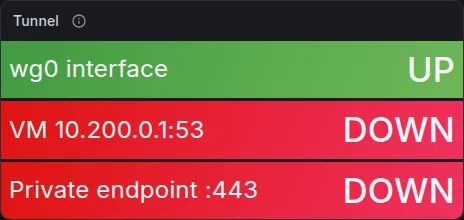
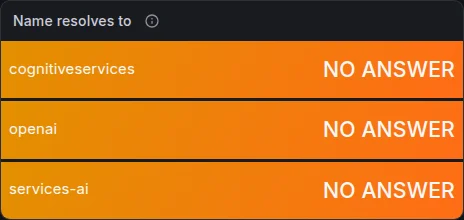
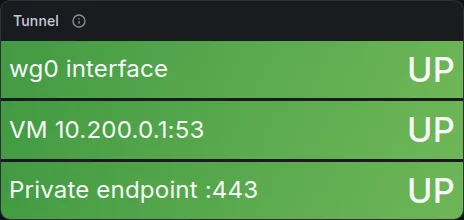
| metrics | Dashboard › Tunnel, Name resolves to | max(pe_probe_vpn_peer_up) | The VM and the private endpoint go DOWN; the names show NO ANSWER instead of falling back to public. |
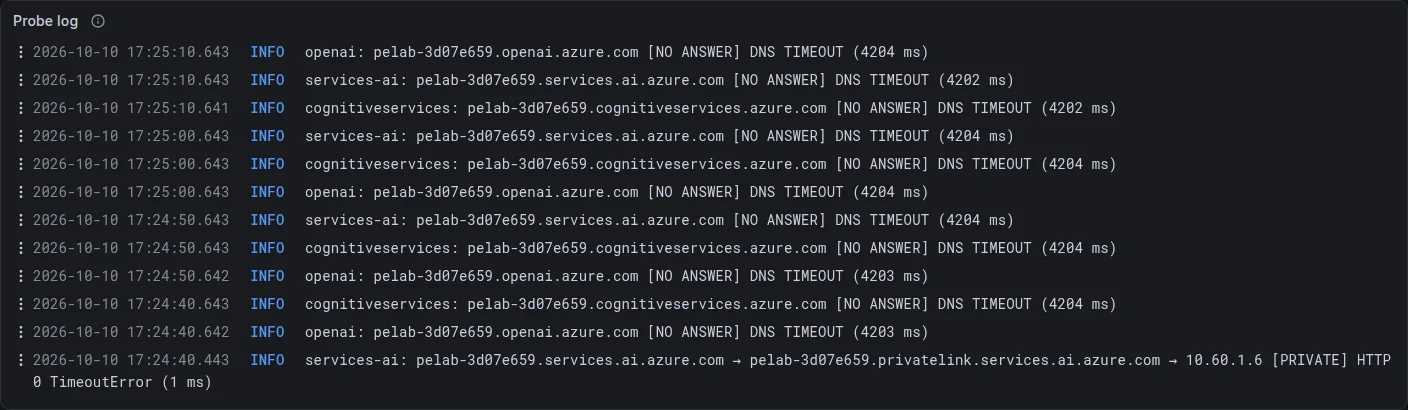
| logs | Dashboard › Probe log | {service_name="pe-probe"} |= "[NO ANSWER]" | DNS TIMEOUT or DNS SERVFAIL for all three names. |
What the screenshots show
make exp-vm-deallocate took 33 seconds. Afterwards the Tunnel panel shows wg0 interface UP, but VM 10.200.0.1:53 and Private endpoint :443 DOWN. Name resolves to shows NO ANSWER for all three names, and the probe log is a column of DNS TIMEOUT (4204 ms) lines: the probe’s 4-second lookup limit, every 10 seconds.
If you predicted “falls back to the public IP”, it doesn’t. One line is worth a second look: the first check after the stop, for services-ai, still had 10.60.1.6 in resolved’s cache. It got as far as the TCP connect and failed with HTTP 0 TimeoutError, because the tunnel now leads nowhere.
Why it happens
Deallocating releases the VM’s compute, so nothing answers WireGuard on 20.102.50.119:51820 any more. WireGuard has no connection state to lose: wg0 on the DGX stays up, and its routes and resolved settings stay in place. Queries for the three domains still go to 10.200.0.1, into a tunnel with no far end, and time out.
Because the routing domains are tied to wg0 and the link is still there, resolved doesn’t try another server for them. The names fail closed. For a private-only account that’s the right behaviour: the public answer would only lead to a 403 anyway. Your application sees a DNS timeout, which is an honest signal that the private path is down.
What it costs: with the VM deallocated you stop paying the $0.0104 per hour for compute. The static public IP ($3.65/month) and the 32 GB disk ($2.40/month) are still billed, which is what keeps the address stable for Experiment 6.
Experiment 6: Start the VM and watch the tunnel come back
Start the VM again and see the DGX reconnect without anyone touching it, thanks to the static IP and PersistentKeepalive.
Start the WireGuard VM again. Don’t touch the DGX.
make exp-vm-startNothing on the DGX is restarted. How long until the first 200: seconds, or minutes?
| Signal | Where | Query | What you should see |
|---|---|---|---|
| metrics | Dashboard › HTTP status over time | max by (host) (pe_probe_http_status) | no response until the VM has booted, then 200 on all three rows. |

What the screenshots show
The timelapse covers the HTTP status of all three names, the most direct “does it work” signal. The outage runs from 17:25:00 to 17:27:00 as orange no response. make exp-vm-start began at 17:25:46 and took 43 seconds. All three rows were green 200 again by about 17:27, roughly 75 seconds after the start command, with nothing touched on the DGX. The Tunnel panel afterwards is UP on all three checks.
The left part of the timeline shows the end of experiment 4 again: openai’s 403 turning to 200 just after 17:21, and services-ai just after 17:23.
My first attempt at this experiment failed, and the reason belongs in this write-up. The VM came back, but WireGuard didn’t start, and the DGX kept timing out. On the VM, journalctl -b showed:
1
dnsmasq.service: Found ordering cycle on wg-quick@wg0.service/start
My cloud-init had added After=wg-quick@wg0.service to dnsmasq, so that dnsmasq would start once the tunnel address existed. But wg-quick@.service is ordered After=nss-lookup.target, and dnsmasq is Before=nss-lookup.target: a loop. systemd breaks such loops by dropping a start job, and it dropped WireGuard. The first boot hid the bug, because cloud-init’s runcmd started both units by hand. The fix was to delete the drop-in: dnsmasq’s bind-dynamic already binds to 10.200.0.1 whenever wg0 appears. The run above is with the fixed cloud-init.
Why it happens
Three settings make the recovery automatic:
- A Standard static public IP. The VM comes back with the same
20.102.50.119, so the DGX’sEndpoint =line is still right (Part 3). wg-quick@wg0enabled on the VM (and nothing blocking it at boot, see above). WireGuard is up as soon as the VM has booted, with the same keys.PersistentKeepalive = 25on the DGX. The DGX keeps sending a packet every 25 seconds, so a new handshake happens within moments of the VM listening again, with no reconnect logic anywhere.
Most of the 75 seconds is Azure starting the VM (43 s for az vm start) and Ubuntu booting. After that it’s at most one keepalive, one probe interval and one export. So stopping the VM overnight is practical: make vm-stop in the evening, make vm-start in the morning, and the DGX just works again.
Check Your Understanding
An SDK call from the DGX returns 403 "Public access is disabled". Which experiment's state are you in, and what do you check first?
Experiment 1, 2 or 3: the name your SDK uses still resolves to a public IP. Check the answer first (resolvectl query <account>.openai.azure.com), not keys or roles. If it’s public, either split DNS isn’t routing that domain to the tunnel, or that name’s privatelink zone is missing.
You've added the missing zone and Azure shows the A record, but the DGX still gets the public IP. What's happening, and how long could it last?
A cache between Azure DNS and your program still holds the public CNAME chain. Here that was up to the 900-second TTL of the privatelink CNAME, about 13 minutes after the fix in this run. Run make dns-flush to clear dnsmasq and resolved.
Why did deallocating the VM produce DNS timeouts rather than the public IP and a 403?
The routing domains belong to wg0, which stays up when the VM goes away. resolved keeps sending those names to 10.200.0.1 and never tries another server for them, so they time out. The names fail closed.
What would break experiment 6 if the public IP were dynamic?
The VM could come back with a different address. The DGX would keep sending WireGuard packets to the old one, and nothing would recover until you updated Endpoint = in wg0.conf.