DGX Spark to Azure Private Endpoint: Monitor
A tour of the lab's Grafana dashboard: which panel answers which question about the private path, the queries behind them, and how long a change takes to show.
The dashboard answers three questions, top to bottom: where does each name resolve now, what does the account say, and is the tunnel itself alive? By the end of this part you’ll be able to look at it and tell a routing problem from a DNS problem from a firewall problem, and you’ll know how many seconds to wait before trusting what it shows.
Open the Dashboard
Open http://localhost:3012, then Dashboards → Labs → DGX Spark to Azure Private Endpoint, or go straight to http://localhost:3012/d/azure-pe-lab/. There’s no login: grafana/otel-lgtm runs with anonymous admin, which is fine on the DGX and nowhere else. Port 3012 isn’t exposed beyond the machine unless you forward it.
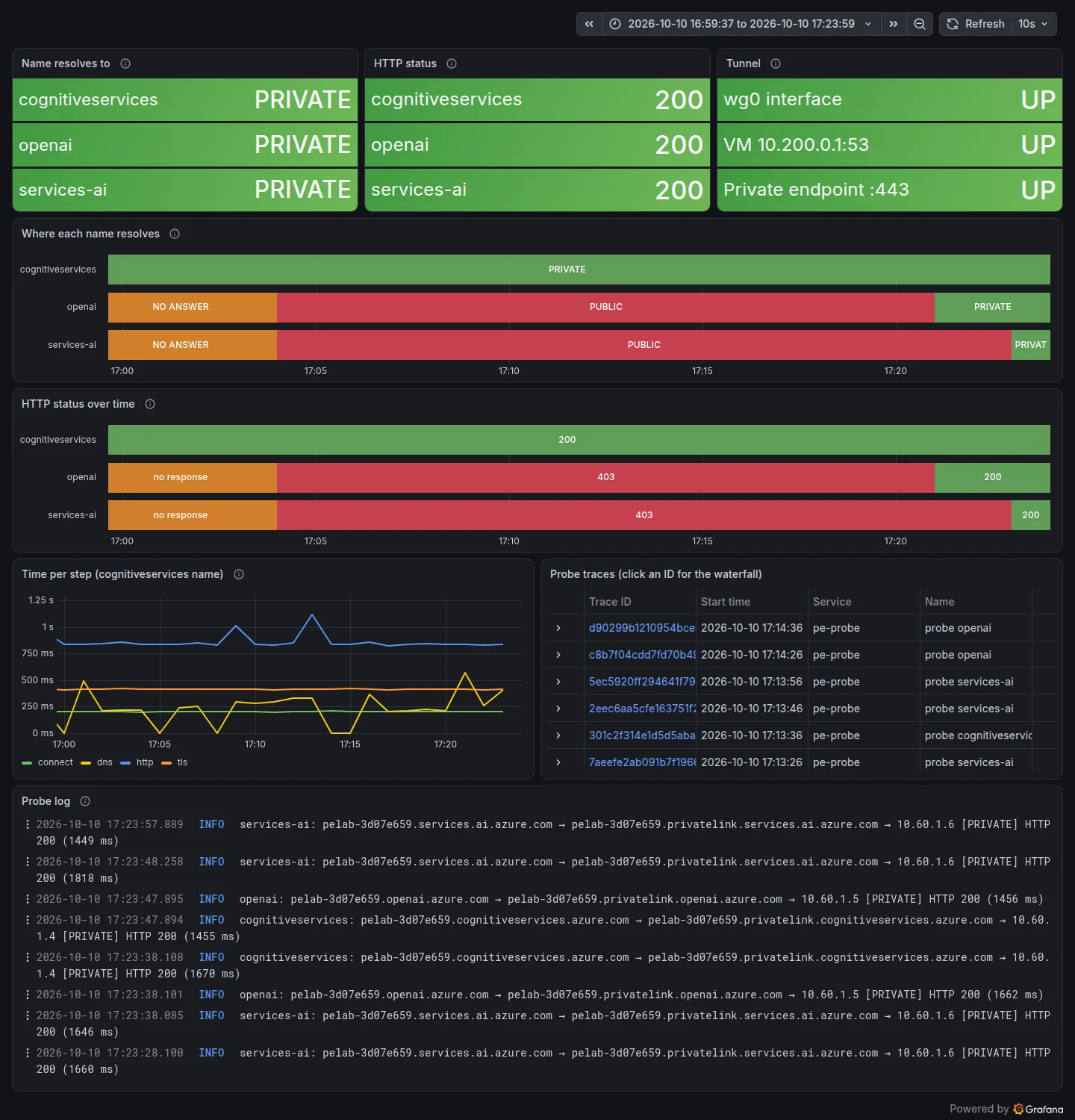 The dashboard as captured right after Experiment 4.
There are no variables. The three names are always shown side by side, because comparing them is the point. The time range defaults to the last 15 minutes and the dashboard refreshes every 10 seconds, the same as the probe’s interval.
Panel by Panel
| Panel | Query | What it answers | Normal once everything is set up |
|---|---|---|---|
| Name resolves to | max by (host) (pe_probe_dns_private) | Did the latest lookup return a private (10.x) or public IP, or nothing? | PRIVATE × 3 |
| HTTP status | max by (host) (pe_probe_http_status) | What did the account answer on each name? 403 means the firewall refused a public caller | 200 × 3 |
| Tunnel | max(pe_probe_wg0_present), max(pe_probe_vpn_peer_up), max(pe_probe_pe_tcp_up) | Is there a wg0? Does the VM answer at 10.200.0.1:53? Does the endpoint’s IP answer on 443? None of these use DNS | UP × 3 |
| Where each name resolves | same as the first panel, over time | When did each name flip? | Green bars |
| HTTP status over time | same as the second panel, over time | When did each call start succeeding or failing? | Green bars |
| Time per step (cognitiveservices name) | max by (phase) (pe_probe_phase_ms{host="cognitiveservices"}) | How long DNS, TCP connect, TLS and the HTTP request take | Connect ≈ one round trip to the region |
| Probe traces | { resource.service.name = "pe-probe" && name =~ "probe .*" } | One trace per check; click an ID for the waterfall | |
| Probe log | {service_name="pe-probe"} \| host=~".+" | The CNAME chain, private or public, and the HTTP result, in words | [PRIVATE] HTTP 200 |
Reading the top row together is how you diagnose:
| Name resolves to | Tunnel | HTTP | Meaning |
|---|---|---|---|
| PUBLIC | DOWN | 403 | No VPN at all (Experiment 1) |
| PUBLIC | UP | 403 | Routing works, DNS doesn’t (Experiment 2) |
| PRIVATE for one name, PUBLIC for another | UP | 200 / 403 | A private DNS zone is missing for that name (Experiment 3) |
| NO ANSWER | wg0 UP, others DOWN | no response | The VM is off or unreachable (Experiment 5) |
The three stat panels use instant queries, evaluated at the moment the dashboard refreshes. With range queries they lag by up to one step, and my first screenshots showed the value from before a change (Part 3).
Explore Queries
Prometheus (PromQL). Everything the probe measures is a gauge labelled by host:
| Query | Returns in this lab |
|---|---|
pe_probe_ok | 1 per name once the name is private and the call returned 2xx |
min(pe_probe_ok) | 1 only when all three names work. The verify target of experiments 4 and 6 |
pe_probe_phase_ms{phase="connect"} | TCP connect time per name: a round trip to East US over the tunnel, or to the public front end |
changes(pe_probe_dns_private[15m]) | How many times each name flipped in the window |
Loki (LogQL):
| Query | Returns |
|---|---|
{service_name="pe-probe"} \| host="openai" | Every check of the openai name |
{service_name="pe-probe"} \|= "[PUBLIC]" | Every check that went to a public IP |
{service_name="pe-probe"} \| http_status="403" | Filter on the structured metadata, no text match |
{service_name="pe-probe"} \|= "[NO ANSWER]" | DNS failures, with the error word (TIMEOUT, SERVFAIL) |
Tempo (TraceQL):
| Query | Returns |
|---|---|
{ resource.service.name = "pe-probe" && span.net.path = "private" } | Checks that used the private path |
{ name = "dns.resolve" && status = error } | Lookups that failed |
{ name = "tcp.connect" && duration > 1s } | Slow connects, for example while the VM is starting |
Open any trace’s dns.resolve span to see the full CNAME chain in its dns.chain attribute. The log line shortens it.
Signal Timing
A change on the DGX or in Azure reaches the dashboard after several delays in a row:
| Delay | Up to | Set by |
|---|---|---|
| Probe interval | 10 s | PROBE_INTERVAL: "10" in docker-compose.yml |
| Metric export | 5 s | PeriodicExportingMetricReader(export_interval_millis=5000) |
| Log and span batching | a few seconds | BatchLogRecordProcessor, BatchSpanProcessor defaults |
| Dashboard refresh | 10 s | "refresh": "10s" |
| Tempo search index | about a minute | Tempo itself: a trace is stored at once but searchable later |
| DNS caches | the record’s TTL | systemd-resolved on the DGX and dnsmasq on the VM |
What I measured: after wg-quick up wg0 returned, the Tunnel metrics flipped 21 seconds later (15:32:23 → 15:32:44). After the resolvectl commands returned, the cognitiveservices name flipped about 22 seconds later (15:33:22 → 15:33:44). The first private trace started at 15:33:56 and could not be found by trace search for the next half minute. That’s why the experiments wait 40 seconds and why verify-split-dns retries the trace search until it answers.
DNS caching adds a delay that the probe can’t shorten. When a record changes in Azure, every cache between Azure DNS and your program keeps the old answer until its TTL runs out. Experiment 4 measures how long that took in practice.
Check Your Understanding
The Tunnel panel is all UP and the names are PRIVATE, but HTTP shows 401. What's wrong?
The network path is fine: the request reached the account through the endpoint. 401 is authentication, so the API key in .state/lab.env is wrong or was rotated. Re-run bash infra/outputs.sh and make probe-up.
You flip something and the stat changes at once, but the trace search finds nothing. Is the probe broken?
Probably not. Metrics are queryable within seconds; Tempo’s search index lags ingestion by up to about a minute. Wait and search again, or open a trace by ID from the log line.
Why does the dashboard show three names when they all point to one account?
Because they don’t share DNS. Each public name has its own privatelink zone and its own private IP, and an SDK uses only one of them. A setup can be fully private for the name you tested and public for the one your code calls.