Getting a Targus DisplayLink Dock Working on the NVIDIA DGX Spark (Ubuntu 24.04, X11)
How I got a Targus DV4K DisplayLink dock driving two extra monitors on an NVIDIA DGX Spark — driver install, Secure Boot, and the xorg.conf fix.
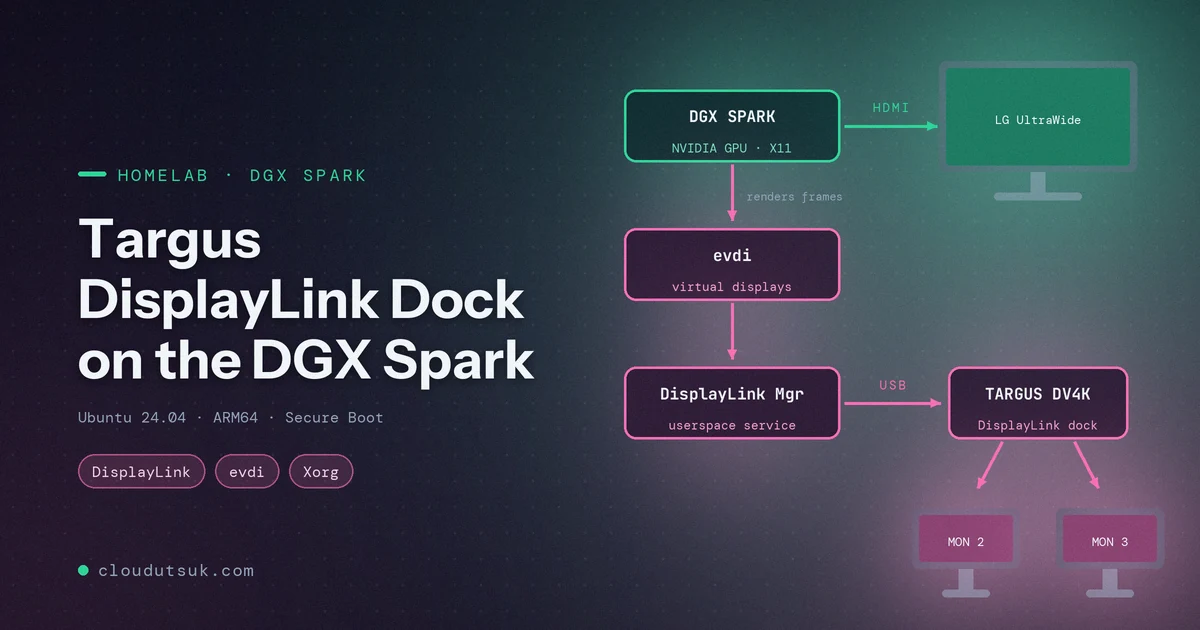
I plugged my Targus docking station into the DGX Spark expecting the usual “it just works” moment. The webcam came alive, the keyboard receiver worked, and my two dock monitors… stayed completely black. What followed was an afternoon of driver downloads, a Secure Boot detour, one config that didn’t work, and one that finally did. This post walks through every step: how to tell what’s actually wrong, how to install the DisplayLink driver on an ARM64 machine with Secure Boot enabled, and why the NVIDIA-generated xorg.conf was quietly ignoring the dock until I gave it an explicit config. If you have a DisplayLink dock and an NVIDIA box running X11, this should save you most of that afternoon.
The setup
Here’s what I was working with:
| Component | Details |
|---|---|
| Machine | NVIDIA DGX Spark (aarch64) |
| OS | Ubuntu 24.04.4 LTS (DGX OS), kernel 6.17.0-1026-nvidia |
| GPU driver | NVIDIA 580.x, X11 session under GDM |
| Dock | Targus USB-C DV4K Docking Station 100W (DOCK182) |
| Monitors | LG UltraWide on the Spark’s HDMI, plus two monitors on the dock |
| Secure Boot | Enabled |
Three monitors in total: one straight into the Spark, two through the dock.
Step 1: Is the dock even detected?
My first instinct was “the dock isn’t recognized.” It turned out that was wrong, and lsusb showed it right away:
1
2
lsusb
lsusb -t
The relevant lines:
1
2
Bus 003 Device 004: ID 1048:4015 Targus Group International DOCK182v4
Bus 004 Device 004: ID 17e9:6028 DisplayLink Targus USB-C DV4K Docking Station 100W Power
And in the tree view, the DisplayLink device looked like this:
1
2
3
4
5
|__ Port 004: Dev 004, If 0, Class=Vendor Specific Class, Driver=[none], 5000M
|__ Port 004: Dev 004, If 1, Class=Application Specific Interface, Driver=[none], 5000M
|__ Port 004: Dev 004, If 2, Class=Audio, Driver=snd-usb-audio, 5000M
...
|__ Port 004: Dev 004, If 5, Class=Communications, Driver=cdc_ncm, 5000M
So the dock was recognized. Its USB hubs worked, its audio worked, its Ethernet worked (cdc_ncm), and the webcam plugged into it worked. The one thing with Driver=[none] was the Vendor Specific interface, which is the video part.
The key realization: the Targus DV4K is a DisplayLink dock. It doesn’t pass native DisplayPort through USB-C like a Thunderbolt dock does. Video is compressed and sent over plain USB, and a userspace driver on the host has to do that work. No driver, no pictures.
Step 2: How DisplayLink works on Linux
Before installing anything, it helped me to understand the moving parts. The DisplayLink stack on Linux has two layers:
evdi(Extensible Virtual Display Interface), an open-source kernel module that creates virtual display devices (/dev/dri/cardN).- DisplayLink Manager, a closed-source userspace service that takes whatever gets drawn onto those virtual displays, compresses it and streams it to the dock over USB.
On top of that, your display server (X11 in my case) has to actually use those virtual displays. That last part is where I got stuck later.
flowchart LR
    A[Desktop / X11 on NVIDIA GPU] -->|renders frames| B[evdi virtual displays<br>/dev/dri/card2..5]
    B --> C[DisplayLink Manager<br>userspace service]
    C -->|compressed over USB| D[Targus DV4K dock]
    D --> E[Monitor 2]
    D --> F[Monitor 3]
    A -->|native HDMI| G[LG UltraWide]
Step 3: Finding a driver that supports ARM64 and kernel 6.17
Two things made me nervous: the Spark is ARM64, and kernel 6.17 is very new. Many “DisplayLink on Linux” guides assume x86_64.
Synaptics (who own DisplayLink now) publish the Ubuntu driver on their download page. At the time of writing the latest was 6.3.0 (April 2026). The release notes list Ubuntu 24.04 and 26.04 support, and the 6.2 notes before it added “preliminary support for kernel 6.17”, so the timing worked out.
Synaptics also runs an APT repository (
synaptics-repository-keyring.deb), but when I checked itsarm64index it only carried theevdipackage, not the DisplayLink Manager itself. The.runinstaller from the download page is the complete package.
After accepting the EULA on the download page, you get a zip:
1
2
3
4
5
cd ~/Downloads
unzip "DisplayLink USB Graphics Software for Ubuntu6.3-EXE.zip"
ls
# displaylink-driver-6.3.0-48.run
# DisplayLink USB Graphics Software for Ubuntu 6.3.0-48-Release Notes.txt
You can list what’s inside the installer without running it. This is how I confirmed there’s an actual ARM64 build:
1
2
3
4
5
sh displaylink-driver-6.3.0-48.run --list | grep DisplayLinkManager
# ./aarch64-linux-gnu/DisplayLinkManager      <-- that's the one
# ./arm-linux-gnueabihf/DisplayLinkManager
# ./x64-ubuntu-1604/DisplayLinkManager
# ./x86-ubuntu-1604/DisplayLinkManager
Test-compile evdi before installing
Since the kernel was so new, I wanted proof that evdi would build before running an installer as root. The installer bundles the evdi source, so you can extract it and do a dry-run build as a normal user:
1
2
3
4
5
sh displaylink-driver-6.3.0-48.run --noexec --nox11 --target dlx
mkdir evdi && tar xzf dlx/evdi.tar.gz -C evdi
cd evdi/module
make -C /lib/modules/$(uname -r)/build M=$PWD modules -j$(nproc)
ls -l evdi.ko
It built cleanly. The only noise was a harmless the compiler differs from the one used to build the kernel warning.
Use
--nox11when extracting. Without it, the makeself installer tried to pop open agnome-terminalwindow on me instead of just extracting.
Step 4: Install the driver
The installer builds evdi through DKMS, so DKMS has to be installed first:
1
2
sudo apt install -y dkms linux-headers-$(uname -r)
sudo ./displaylink-driver-6.3.0-48.run
The Secure Boot detour
My Spark has Secure Boot enabled:
1
2
mokutil --sb-state
# SecureBoot enabled
With Secure Boot on, the kernel refuses to load unsigned modules, and a freshly compiled evdi is unsigned. On Ubuntu, DKMS handles this by generating a local Machine Owner Key (MOK), signing the module with it, and queuing the key for enrollment in the firmware. During the install it asked me to set a one-time password.
Before rebooting, I checked that everything was actually in place:
| What | Where | Status |
|---|---|---|
| Built module | /lib/modules/6.17.0-1026-nvidia/updates/dkms/evdi.ko.zst | ✅ |
| Load at boot | /etc/modules-load.d/evdi.conf | ✅ |
| Module options | /etc/modprobe.d/evdi.conf (initial_device_count=4, soft dependency on nvidia_drm) | ✅ |
| Service | /lib/systemd/system/displaylink-driver.service | ✅ |
| Hotplug rule | /lib/udev/rules.d/99-displaylink.rules (matches vendor 17e9) | ✅ |
| Signing key | /var/lib/shim-signed/mok/MOK.der | ✅ |
| Pending enrollment | MokNew EFI variable present | ✅ |
Then I rebooted, with a monitor plugged directly into the Spark’s HDMI. This matters because the MOK enrollment screen appears before any drivers load, so a DisplayLink monitor can’t show it.
On the blue MOK management screen: Enroll MOK → Continue → Yes, enter the password, Reboot.
The MOK screen has a short timeout. If you miss it, nothing breaks, but
evdiwon’t load. Queue the key again withsudo mokutil --import /var/lib/shim-signed/mok/MOK.derand reboot.
Verifying the driver after reboot
1
2
3
4
5
6
7
8
9
10
11
lsmod | grep evdi
# evdi                   86016  2

modinfo evdi | grep signer
# signer:         spark-0be9 Secure Boot Module Signature key

systemctl is-active displaylink-driver
# active

ls /sys/class/drm/
# card0  card1  card2  card2-DVI-I-1  card3  card3-DVI-I-2  card4 ...
The module was loaded and signed, the service was running, and four evdi virtual displays existed. Two of them (DVI-I-1, DVI-I-2) reported connected. The driver side was done.
My monitors were still black.
Step 5: Why the monitors were still black
This was the frustrating part. Everything below the desktop was working, but the desktop didn’t know the new displays existed:
1
2
3
xrandr --listproviders
# Providers: number : 1
# Provider 0: ... name:NVIDIA-0
Just one provider, the NVIDIA GPU. The DisplayLink outputs weren’t there.
The
USB-C-0toUSB-C-3outputs you see inxrandron a Spark are the NVIDIA GPU’s own USB-C display ports. They have nothing to do with the dock, so don’t let them confuse you like they confused me for a minute.
I first tried switching to a Wayland session, since GNOME on Wayland handles DisplayLink more gracefully. On this machine, though, the login screen didn’t offer a session picker, so X11 it was.
Attempt 1: an OutputClass snippet (didn’t work)
The textbook fix is a small drop-in file telling X to use the modesetting driver for evdi devices:
1
2
3
4
5
6
7
# /etc/X11/xorg.conf.d/20-displaylink.conf
Section "OutputClass"
    Identifier  "DisplayLink"
    MatchDriver "evdi"
    Driver      "modesetting"
    Option      "AccelMethod" "none"
EndSection
I restarted GDM. Still nothing.
The Xorg log for my session (/var/log/Xorg.1.log, not Xorg.0.log, which belongs to the login screen) explained why:
1
2
3
(II) xfree86: Adding drm device (/dev/dri/card2)
(II) Platform probe for /sys/devices/platform/evdi.0/drm/card2
(II) systemd-logind: got fd for /dev/dri/card2 226:2 fd 16 paused 0
X saw all four evdi devices, and then did nothing with them. The reason was /etc/X11/xorg.conf. DGX OS ships one generated by nvidia-xconfig, with a fixed ServerLayout, one Device section (Driver "nvidia") and one Screen. With an explicit config like that, X only loads the drivers named in it, so my OutputClass rule never got a chance to apply.
Attempt 2: declare the DisplayLink devices explicitly (worked)
The fix was to stop hoping X would find the devices on its own and declare them in xorg.conf. Two changes:
- One
Devicesection per evdi display, using themodesettingdriver and pointing at the device node through/dev/dri/by-path/(those names stay the same across reboots, unlikecardNnumbers). GPUDevicelines in the existingScreensection, which attach those devices as secondary GPUs of the NVIDIA screen.
Everything else in the original file stayed exactly as it was. The additions:
1
2
3
4
5
6
7
8
9
10
11
12
13
14
15
16
17
18
19
20
21
22
23
24
Section "Device"
    # DisplayLink virtual display 0 (evdi)
    Identifier     "DisplayLink0"
    Driver         "modesetting"
    Option         "kmsdev" "/dev/dri/by-path/platform-evdi.0-card"
    Option         "AccelMethod" "none"
EndSection

# ... same for DisplayLink1, DisplayLink2, DisplayLink3 (evdi.1 .. evdi.3)

Section "Screen"
    Identifier     "Screen0"
    Device         "Device0"
    GPUDevice      "DisplayLink0"
    GPUDevice      "DisplayLink1"
    GPUDevice      "DisplayLink2"
    GPUDevice      "DisplayLink3"
    Monitor        "Monitor0"
    DefaultDepth    24
    Option         "AllowEmptyInitialConfiguration" "True"
    SubSection     "Display"
        Depth       24
    EndSubSection
EndSection
What each piece does:
Driver "modesetting": the generic KMS driver built into Xorg. evdi exposes a standard DRM/KMS interface, so this is all it needs.kmsdev: tells modesetting exactly which DRM node to open, instead of letting it guess.AccelMethod "none": evdi has no GPU of its own, so there’s nothing to accelerate. The NVIDIA GPU does the rendering.GPUDevice: attaches each DisplayLink device toScreen0as an output-only secondary GPU (in RandR terms, a sink provider).
Here’s how I applied it, with a backup first:
1
2
3
4
sudo cp /etc/X11/xorg.conf /etc/X11/xorg.conf.backup
sudo cp xorg.conf.displaylink /etc/X11/xorg.conf
sudo rm -f /etc/X11/xorg.conf.d/20-displaylink.conf   # remove attempt 1
sudo systemctl restart gdm
Restarting GDM logs you out instantly and closes every app. Save your work first. If X fails to start, press Ctrl+Alt+F3, log in on the text console and restore the backup:
sudo cp /etc/X11/xorg.conf.backup /etc/X11/xorg.conf && sudo systemctl restart gdm.
The last piece: linking outputs at login
With the devices loaded, X lists them as modesetting providers, but they still need to be told to display frames rendered by the NVIDIA GPU. That’s done with xrandr --setprovideroutputsource. I put it in a small script that runs at every login:
1
2
3
4
5
6
7
8
9
10
11
#!/bin/sh
# ~/.local/bin/displaylink-xrandr.sh
# Attach DisplayLink outputs to the NVIDIA GPU and turn on connected monitors
sleep 3
for p in $(xrandr --listproviders | awk '/modesetting/ {print $4}'); do
    xrandr --setprovideroutputsource "$p" NVIDIA-0
done
sleep 1
xrandr --auto
# Hide the phantom output from the boot framebuffer (simple-framebuffer)
for o in $(xrandr | awk '/^None-.* connected/ {print $1}'); do xrandr --output "$o" --off; done
And a GNOME autostart entry to run it:
1
2
3
4
5
6
7
# ~/.config/autostart/displaylink-xrandr.desktop
[Desktop Entry]
Type=Application
Name=DisplayLink outputs
Exec=/home/<you>/.local/bin/displaylink-xrandr.sh
X-GNOME-Autostart-enabled=true
NoDisplay=true
I logged back in, and after a couple of seconds both dock monitors lit up. I actually said “finally” out loud.
1
2
3
HDMI-0    connected primary 2560x1080+0+555
DVI-I-3-3 connected 2560x1080+2560+0
DVI-I-4-4 connected 3440x1440+2560+1080
Two surprises worth knowing about
“Why does it show four monitors when I have three?”
I asked this myself. The 4 comes from initial_device_count=4 in /etc/modprobe.d/evdi.conf: the installer creates four virtual display slots at boot, and DisplayLink Manager uses one per monitor on the dock. Unused slots just sit there as unknown/disconnected. I declared all four in xorg.conf on purpose, because DisplayLink doesn’t always put a given monitor in the same slot. (You can see it happened here: after the restart my monitors came up on DVI-I-3 and DVI-I-4, not 1 and 2.)
The phantom screen
Once modesetting was in play, X also picked up the Spark’s basic boot framebuffer (simple-framebuffer, card0) as a fifth provider. It showed up as a fake None-5-1 1920x1080 display parked to the right of my real monitors, where windows and the mouse cursor could wander off. The last loop in the login script turns it off.
What the final setup looks like
| Piece | Location | Purpose |
|---|---|---|
| DisplayLink 6.3.0 | /usr/lib/displaylink-driver/ | Userspace manager, started by udev when the dock is plugged in |
evdi (DKMS, MOK-signed) | /lib/modules/$(uname -r)/updates/dkms/ | Virtual display devices |
xorg.conf | /etc/X11/xorg.conf (original in xorg.conf.backup) | Loads modesetting for evdi as GPU screens |
| Login script | ~/.local/bin/displaylink-xrandr.sh + autostart entry | Links outputs to NVIDIA, hides the phantom screen |
Things to watch in the future
- Kernel updates: DKMS should rebuild
evdiautomatically. If the dock monitors go dark after an update,dkms statusis the first thing to check. - NVIDIA driver updates /
nvidia-xconfig: either could regenerate/etc/X11/xorg.confand wipe out the DisplayLink sections. Keep a copy of the working file somewhere safe. - Performance: DisplayLink compresses frames on the CPU. It’s fine for terminals, browsers and docs. Fast-moving video on the dock monitors won’t be as smooth as on the native HDMI.
- Keep the installer: store the
.runfile somewhere permanent in case you need to reinstall.
Conclusion
Looking back, the problem was never “the dock isn’t recognized.” It was three separate layers, each of which had to be fixed on its own:
- Driver: the DisplayLink/evdi stack isn’t in stock Ubuntu, so it had to be installed (and luckily 6.3.0 ships an ARM64 build that handles kernel 6.17).
- Secure Boot: the freshly built kernel module had to be signed and its key enrolled through the MOK screen.
- Display server: NVIDIA’s explicit
xorg.confmeant X ignored the new devices until they were declared asGPUDevices and linked withxrandr.
Checking layer by layer (lsusb -t → lsmod/modinfo → /sys/class/drm → xrandr --listproviders → the session’s Xorg log) is what turned an afternoon of guessing into a fix I actually understand. I worked through it with Claude Code as a pair, which made digging through logs and generating the config much faster. The reboots and the sudo commands were still mine to run, and I’m fine with that split.
If you’re setting up your own Spark homelab, I hope this saves you that afternoon. And if you’ve got DisplayLink working under Wayland on a Spark, I’d love to hear how in the comments.