System Design Fundamentals: A Structured Roadmap
A module-by-module roadmap of system design fundamentals, from scalability and networking to sagas, observability and security.
“Design a URL shortener.” Most people freeze on that prompt, and it’s rarely for lack of knowledge. They’ve read about caching, sharding and Kafka, but in no particular order, so they have nowhere to start. I’ve come to think system design is best learned in layers: you can’t reason about sharding until replication makes sense, and sagas only make sense once you’ve seen why two-phase commit hurts. This post is that order, module by module. For each one you get the core idea, the trade-off that actually matters, and what I’d check in a design review.
The roadmap at a glance
Press play, or step through it: each stop is one module, in the order I’d learn them.
- 1. Core concepts: Scalability, availability, latency, consistent hashing and CAP: the vocabulary every later decision is judged against.
- 2. Networking: TCP vs UDP, HTTP versions, DNS and proxies. When something breaks, you need to know which layer is lying.
- 3. Load balancing: L4 or L7, round robin or least connections, plus DNS and Anycast for spreading traffic across regions.
- 4. APIs: REST, GraphQL or gRPC, gateways, rate limits and idempotency keys. The contract you can't refactor quietly.
- 5. Communication: Polling, SSE, WebSockets, queues, pub/sub and CDC. How components talk decides how far a failure spreads.
- 6. Caching: Cache-aside, write-through, eviction and stampede protection. Lookup is easy; invalidation is the real design.
- 7. Databases: Pick by access pattern: relational, key-value, document, wide-column, graph, search or vector.
- 8. Database scaling: Indexes first, then denormalise, cache, replicate and finally shard. Each step costs more complexity.
- 9. Storage: Block, file and object storage, distributed file systems, and erasure coding for cheap durability.
- 10. Architecture: Monolith, microservices, serverless, event-driven, CQRS and event sourcing. Start simple; split for teams.
- 11. Microservices patterns: Discovery, gateway, BFF, sidecar, circuit breaker, bulkhead and service mesh: standard answers to recurring problems.
- 12. Distributed systems: Unreliable networks, consensus, clock drift, fencing tokens and CRDTs. Single-machine intuition stops here.
- 13. Distributed transactions: 2PC blocks; sagas with compensations plus the transactional outbox are the practical default.
- 14. Data structures: Bloom filters, HyperLogLog, Count-Min Sketch, geohash and Merkle trees trade a little accuracy for scale.
- 15. Big data: Batch vs stream, ETL vs ELT, lakes vs warehouses, and Kappa over Lambda when one code path is enough.
- 16. Deployment: Rolling, blue-green, canary, feature flags and expand-migrate-contract schema changes.
- 17. Observability: Structured logs, RED/USE metrics, distributed traces, and SLOs with error budgets.
- 18. Security: TLS and mTLS, envelope encryption, managed secrets, least-privilege RBAC and SSO federation.
Eighteen modules sounds like a lot, so I group them into four bands. If you only have a weekend, do the first band properly rather than skimming all four. For the 30 individual building blocks in more depth, see System Design - Building Blocks.
| Band | Modules | What you come away with |
|---|---|---|
| Foundations | 1–4: core concepts, networking, load balancing, APIs | How one request travels, and what “good” means |
| Data and scale | 5–9: communication, caching, databases, scaling, storage | Where state lives and how it grows |
| Distributed systems | 10–14: architecture, microservices, distributed systems, transactions, data structures | How many machines cooperate and fail |
| Data platforms and operations | 15–18: big data, deployment, observability, security | How the system gets shipped, watched and protected in production |
1. Core concepts
These are the words you’ll use to judge every later decision, so it’s worth being precise.
Scalability is handling more load by adding resources. Vertical scaling (a bigger box) is boring and underrated: it needs no code changes, and a single modern server goes a very long way. Horizontal scaling (more boxes) has no fixed ceiling, but it makes you pay up front: services have to be stateless and data has to be partitioned. I’d scale vertically until it gets uncomfortable, and design so the horizontal option is still open.
Availability is the share of time the system answers. Each extra nine cuts the downtime budget tenfold: 99.9% gives you about 8.8 hours a year, 99.99% about 53 minutes. The gap between those two is usually the gap between “someone gets paged and fixes it” and “failover has to be automatic”. Reliability is a different thing: whether the answers are correct. A cache serving stale prices fast is available but not reliable.
The other concepts in this module:
- Single point of failure (SPOF): anything whose loss takes everything down. You remove it with redundancy and automatic failover. A standby nobody has ever failed over to doesn’t count.
- Latency vs throughput: time per request vs requests per second. Batching improves throughput and usually makes latency worse.
- Consistent hashing: keys sit on a ring, so adding a node moves roughly
1/Nof them instead of almost all of them. - CAP: while a network partition lasts, you choose between consistency and availability. PACELC adds the part people forget: even with no partition, you trade latency against consistency.
Treat CAP as a choice you make per operation during a partition, not a label for a product. “MongoDB is CP” is the kind of sentence that loses points in an interview.
2. Networking
Every distributed system comes down to processes sending bytes over a network that occasionally lies to them. You don’t need to be a network engineer, but you do need to tell layers apart when something breaks: is it DNS, TLS, a TCP timeout, or routing?
The parts that come up again and again:
- TCP vs UDP: TCP gives ordered, reliable delivery but pays for a handshake and suffers head-of-line blocking. UDP is fast and leaves reliability to you, which is why video, games and DNS use it.
- HTTP/1.1 → 2 → 3: HTTP/2 multiplexes many requests over one connection; HTTP/3 moves to QUIC over UDP to get rid of TCP’s head-of-line blocking.
- DNS: hierarchical and heavily cached. Your TTL is your DNS failover time, and plenty of clients ignore it anyway.
- Proxies: a forward proxy acts for clients (egress control); a reverse proxy acts for servers (TLS termination, routing, caching).
- Checksums: cheap insurance against corrupted bytes in transit and on disk.
Under all of that sits a limit no protocol removes: distance. Light in fibre covers about 200 km per millisecond, so a user on the far side of the world pays for every round trip before your server does any work. Step through it below, then tick the box to see what moving data closer to the user buys you.
- One origin, one far user: The app runs in US-East. A user in Sydney opens it, and every request is a round trip to wherever the data lives.
- Halfway around the world (origin): About 16,000 km each way. Light in fibre alone needs over 150ms for the round trip; real routes take about 200ms, before any server work.
- Then wait for the reply (origin): The answer travels the same distance back. A page that makes five calls in sequence spends about a second just waiting on distance.
- Replicate to Europe (nearest): Instead, copy the data out from the origin. Replication runs in the background, so users never wait on this hop.
- Then to India (nearest): Each copy lags the origin slightly (asynchronous replication). That is the PACELC trade from module 1: lower latency for weaker consistency.
- And to Singapore (nearest): Now a replica sits in AP-Southeast, a few thousand kilometres from the user instead of sixteen thousand.
- Route to the nearest region (nearest): Geo-DNS or anycast sends the user to the closest healthy region: about 90ms round trip instead of 200ms.
- Answer locally (nearest): Reads are served nearby. Writes still travel to the origin, so this helps read-heavy traffic most, the same bet a CDN or cache makes.
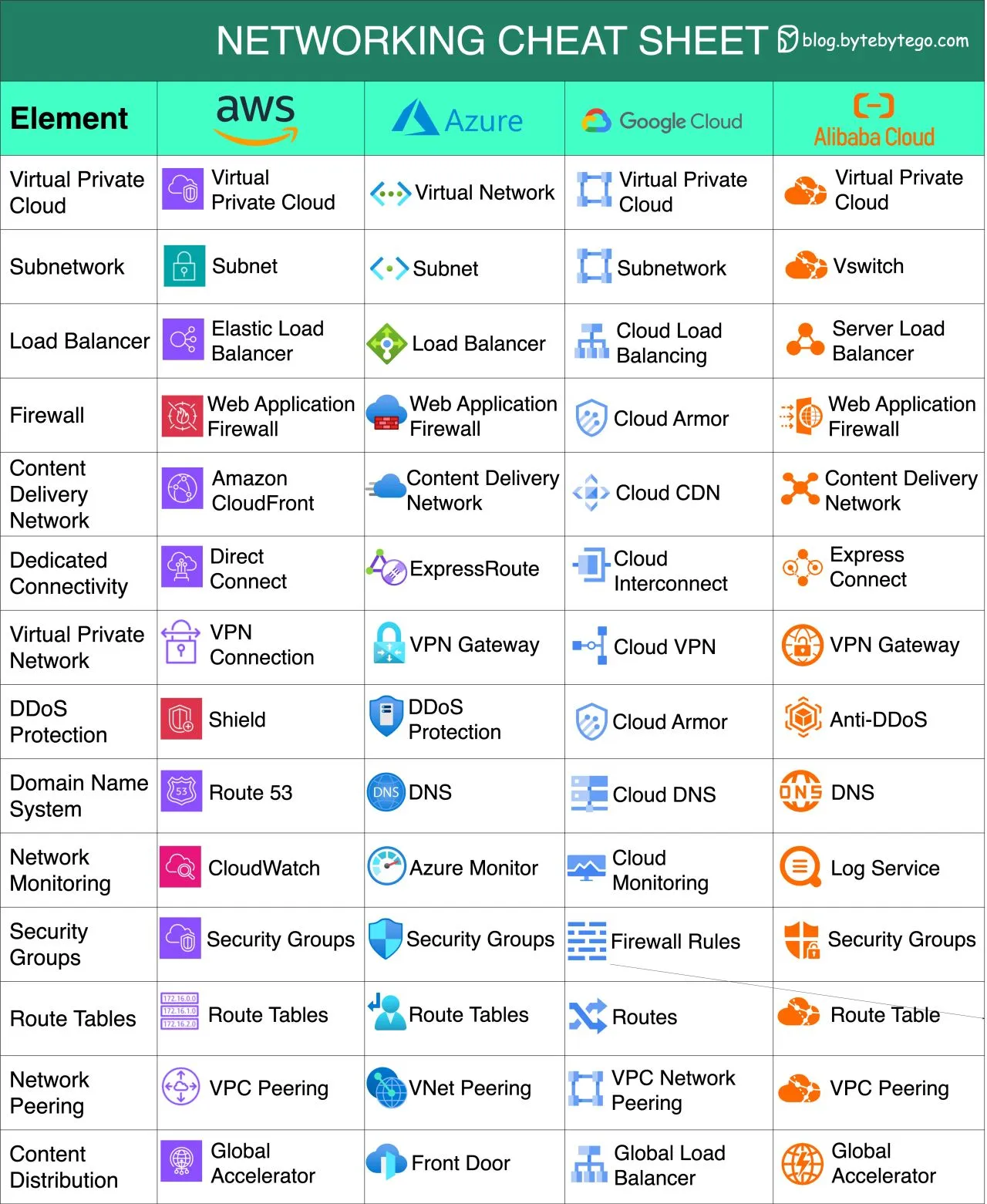
There’s more in the networking cheatsheet I keep around.
3. Load balancing
A load balancer spreads requests across healthy backends and hides individual servers from clients. The first real decision is which layer it works at:
| Layer | Sees | Typical use |
|---|---|---|
| L4 (transport) | IP and port | Very fast, protocol-agnostic TCP/UDP balancing |
| L7 (application) | Headers, path, cookies | Path routing, canary splits, auth offload |
For algorithms, round robin works when requests cost about the same, and they often don’t. Least connections or least response time adapt to uneven work. IP hash or consistent hashing gives you sticky routing, which helps when backends keep a local cache.
Above a single balancer, DNS load balancing spreads traffic across regions, and Anycast announces one IP from many locations so the network itself delivers each user to the nearest one. That’s how CDNs and global front doors work. I’ve written more about this in Load Balancing.
4. API fundamentals
Your API is the one part of the system you can’t refactor quietly, because someone else’s code depends on it. So the basics are worth getting right early: clear resource names, explicit versioning, pagination on every list endpoint, and idempotency keys on writes, so a retried POST /payments doesn’t charge twice.
| Style | Strength | Weakness | Good fit |
|---|---|---|---|
| REST | Simple, cacheable, universal | Over-/under-fetching | Public APIs, CRUD |
| GraphQL | Clients ask for exactly the fields they need | Caching and query-cost control are harder | Many different frontends |
| gRPC | Binary, fast, typed contracts, streaming | Weak browser support | Internal service-to-service |
An API gateway puts auth, routing and rate limiting in one place. For rate limiting, a token bucket allows short bursts, a leaky bucket smooths output, and sliding-window counters sit in between. In a cluster the counter has to live in a shared store, usually Redis:
1
2
3
4
5
6
7
8
9
-- Fixed-window rate limit in Redis (run with EVAL, KEYS[1]=user key, ARGV[1]=limit, ARGV[2]=window secs)
local current = redis.call("INCR", KEYS[1])
if current == 1 then
  redis.call("EXPIRE", KEYS[1], ARGV[2])
end
if current > tonumber(ARGV[1]) then
  return 0  -- reject
end
return 1    -- allow
On auth: OAuth 2.0 handles delegated access, OIDC adds identity on top of it, and SSO lets one login work across apps. People mix these up constantly. OAuth on its own doesn’t tell you who the user is.
5. Communication patterns
How components talk decides how tightly they’re coupled, and so how far one failure spreads.
For pushing updates to clients, the progression is short polling (simple, wasteful), long polling (holds the request open until there’s news), Server-Sent Events (one-way push over plain HTTP) and WebSockets (full duplex). My default for dashboards and notifications is SSE: it’s much simpler to run than WebSockets, and most “real-time” features only need server-to-client.
Between services, the important move is from synchronous calls to asynchronous messaging. A queue separates producer from consumer in time and absorbs spikes. Pub/sub sends one event to many independent subscribers. Webhooks are pub/sub across company boundaries, so they need signatures and retries. Change Data Capture streams changes out of the database’s log, so the app never has to write to two places. And a dead letter queue parks the poison message that would otherwise block the queue forever.
Almost every queue gives you at-least-once delivery. Make consumers idempotent instead of chasing exactly-once guarantees.
6. Caching
A cache trades freshness for speed. Lookup is the easy part; deciding when cached data is wrong is the hard part.
| Strategy | How it works | Trade-off |
|---|---|---|
| Cache-aside | App reads cache, falls back to DB, then fills the cache | Simple; first read always misses |
| Read-through | The cache loads from the DB itself | Cleaner app code |
| Write-through | Write to cache and DB together | Consistent; slower writes |
| Write-back | Write to cache, flush to DB later | Fast writes; data loss if the cache dies |
| Write-around | Write to the DB only | Keeps one-off writes out of the cache |
Cache-aside with a TTL covers most cases. Eviction is usually LRU, sometimes LFU for skewed workloads. CDNs are the same idea at the network edge, and distributed caches like Redis Cluster spread keys across nodes with hashing.
The failure mode to know is the cache stampede. Picture a homepage key cached for 60 seconds. It expires, and the 5,000 requests arriving that second all miss and hit the database together. The fixes are request coalescing (one request rebuilds, the others wait), a short rebuild lock, refreshing early before expiry, or adding random jitter to TTLs so hot keys don’t expire at the same moment.
7. Databases
Choose a database by how you’ll read and write the data, not by what’s popular this year. My default is still PostgreSQL. It’s relational with real ACID transactions, and with JSONB and pgvector it covers more “NoSQL” use cases than people expect. Switch to something else when the data or the access pattern needs it:
- Key-value (Redis, DynamoDB): O(1) lookups by key at huge scale.
- Document (MongoDB): flexible records shaped like the objects you read.
- Wide-column (Cassandra): enormous write throughput, with tables designed around the queries.
- Graph (Neo4j): when the relationships are what you’re querying.
- Search (OpenSearch): inverted indexes for full-text search and relevance.
- Vector: similarity search over embeddings for RAG and recommendations.
One level down, storage engines explain a lot of behaviour. B-trees update in place and suit read-heavy workloads. LSM trees turn writes into sequential appends and compact them in the background, which is why Cassandra and RocksDB handle writes so well and why reads sometimes cost more. Durability comes from the write-ahead log and your fsync settings, so check them instead of assuming they’re safe.
More in the databases section of this blog.
8. Database scaling
Order matters here, because each step costs more complexity than the one before:
- Indexes and query fixes. Run
EXPLAIN ANALYZEbefore buying hardware. A missing composite index explains a surprising share of “we need to shard” conversations. - Denormalize hot read paths to avoid expensive joins.
- Cache repeated reads (module 6).
- Replicate: leader-follower for read scaling and failover; multi-leader or leaderless for multi-region writes, at the price of resolving conflicts.
- Shard by range, hash or directory. The shard key decides where hot spots form, which queries go cross-shard, and how painful resharding will be. Pick it from your most common query.
- Compress and archive cold data.
1
2
3
4
5
6
-- Before sharding anything, check whether the planner is doing a sequential scan
EXPLAIN ANALYZE
SELECT * FROM orders WHERE customer_id = 42 AND created_at > now() - interval '30 days';

CREATE INDEX CONCURRENTLY idx_orders_customer_created
  ON orders (customer_id, created_at DESC);
9. Storage systems
| Type | Access model | Examples | Use |
|---|---|---|---|
| Block | Raw fixed-size blocks | EBS, Azure Managed Disks | Databases, VM disks |
| File | Hierarchical paths | EFS, Azure Files, NFS | Shared file systems |
| Object | Flat key → blob + metadata | S3, Azure Blob, GCS | Media, backups, data lakes |
Distributed file systems like HDFS split files into chunks spread across many nodes. Erasure coding is the clever part: instead of keeping three full copies, you store data plus parity fragments and get similar durability for much less raw disk. Object stores use it heavily behind the scenes.
10. Architectural patterns
Here’s a slightly unpopular opinion: start with a well-structured monolith. One deployable unit is the fastest thing to build, test and debug. Microservices mainly scale teams. They let independent groups ship independently, and in exchange you get every problem in modules 11 to 13. If you have one team, that cost buys you very little.
The rest of the catalogue, briefly:
- Serverless: event-triggered functions billed per invocation. Watch for cold starts, execution time limits and lock-in.
- Event-driven: services react to events. Loose coupling, but a flow is harder to follow end to end.
- Peer-to-peer: every node is both client and server.
- CQRS: separate write and read models so each can be optimized on its own.
- Event sourcing: store events, not current state, and rebuild state by replaying them. You get a free audit log and time travel, and you pay with event versioning and projections to maintain.
See also Software Architecture Styles.
11. Microservices patterns
Once you have many services, the same problems keep coming back, and each one has a standard answer:
| Problem | Pattern |
|---|---|
| Where is service X right now? | Service discovery (registry, DNS) |
| One entry point for clients | API gateway |
| Mobile and web need different payloads | Backend for Frontend (BFF) |
| Cross-cutting concerns without code changes | Sidecar |
| A failing dependency drags everyone down | Circuit breaker |
| One noisy caller uses up shared threads | Bulkhead |
| mTLS, retries and traffic shaping across the fleet | Service mesh |
The circuit breaker deserves its own mention, because naive retries are how one slow service turns into a site-wide outage. Every caller retries three times, load triples, and the struggling service has no chance to recover. A breaker stops calling after repeated failures and probes now and then to see if the service is back.
12. Distributed systems
This is where intuitions from a single machine stop working. Messages get lost, delayed, duplicated or reordered, and a timeout tells you nothing about whether the other side did the work. Every design in this module is a way of living with that.
Consensus (Raft, Paxos) lets a cluster agree on a value or a leader as long as a majority is alive. That’s why etcd and ZooKeeper clusters run 3 or 5 nodes, never 4. Clocks drift, so you can’t order events by wall-clock time across machines: Lamport clocks give a causal order, and vector clocks detect concurrent updates. Distributed locks are harder than they look. A client can pause for a GC run, lose its lease, wake up and write anyway, so the storage layer has to reject stale writes using fencing tokens. CRDTs take the opposite approach: data types designed so concurrent updates always merge cleanly, which is what collaborative editors rely on.
13. Distributed transactions
When one business action (“place order”) touches several services, you need a way to keep them consistent.
Two-phase commit gives you atomicity through a coordinator: prepare, then commit. Its weak spot is blocking. If the coordinator dies after participants have prepared, they sit holding locks until it comes back. 3PC tries to fix that and still breaks under real partitions, so you’ll rarely see it.
The practical answer is the saga: a chain of local transactions, each paired with a compensating action (reserve stock ↔ release stock). You can run it as choreography, where services react to each other’s events, or orchestration, where a coordinator drives each step. Pair it with the transactional outbox: write the business row and the event in the same local transaction, and let a relay or CDC publish it. That removes the dual-write bug where the database commits and the message never goes out.
In microservices, saga + outbox + idempotent consumers is the default. 2PC across service boundaries is almost always the wrong tool.
14. Data structures for scale
These structures give up a little accuracy for huge savings in memory and time:
| Structure | Answers | Catch |
|---|---|---|
| Bloom filter | “Definitely not / maybe present” | False positives, never false negatives |
| HyperLogLog | Count of distinct items | ~12 KB for billions of items, ~1% error |
| Count-Min Sketch | Approximate frequency, heavy hitters | Overestimates, never under |
| Geohash / quadtree | “What’s near me?” | Edge cases at cell boundaries |
| Merkle tree | Which parts of two replicas differ | Needs a tree rebuild as data changes |
| Skip list / trie | Ordered sets, prefix search | Memory overhead |
Bloom filters are worth knowing first, because they show up everywhere: LSM-tree databases check one before reading an SSTable from disk.
15. Big data processing
Batch processing works on bounded data at high throughput (nightly jobs, MapReduce, Spark). Stream processing works on unbounded data with low latency (Kafka plus Flink). ETL transforms data before loading it; ELT loads raw data first and transforms it inside a cloud warehouse, which is where most teams have ended up. Data lakes are cheap and schema-on-read; warehouses are curated and fast; the lakehouse tries to give you both.
The two classic architectures differ in one way. Lambda runs a batch layer and a speed layer and merges them at query time, so you maintain the same logic twice. Kappa treats everything as a stream and reprocesses by replaying the log. If you can, pick Kappa and keep one code path.
16. Deployment patterns
Rolling deployments replace instances a few at a time and need no extra capacity, but two versions run side by side for a while. Blue-green keeps two full environments and switches traffic at once, so rollback is just as fast. Canary sends a small slice of traffic to the new version and widens it while the metrics stay healthy. Feature flags separate deploying code from releasing a feature, which takes a lot of the fear out of Friday deploys.
The pattern I’d make mandatory is expand → migrate → contract for schema changes. Add the new column, deploy code that writes both, backfill, switch reads, and only then drop the old column. A schema change shipped in the same deploy as the code that depends on it will eventually take you down mid-rollout.
Related reading in the DevOps section.
17. Observability
You can’t operate what you can’t see. Logs should be structured JSON with a correlation ID on every line. Metrics are cheap time series: track RED (rate, errors, duration) for services and USE (utilization, saturation, errors) for resources. Traces follow one request across services with OpenTelemetry, and they’re the only quick way to answer “where did the 800 ms go?”
On top of those, define SLIs, set SLOs, and spend the error budget deliberately. Alert on symptoms users feel, like error rate and latency, not on every CPU spike, or your on-call engineers will learn to ignore pages.
18. Security
- TLS everywhere, and mTLS between services if you have a mesh.
- Encryption at rest with envelope encryption: data keys encrypt the data, a KMS key encrypts the data keys.
- Secrets live in Vault or the cloud key store and get rotated automatically, never baked into images.
- RBAC for most authorization, ABAC when roles multiply, and least privilege throughout.
- SAML / OIDC federation for enterprise SSO.
The cybersecurity and DevSecOps sections go deeper.
Common pitfalls
These are the mistakes that come up most often in design reviews and mock interviews:
- Jumping to boxes before numbers. Without rough QPS and storage figures you can’t tell whether you need a cache, let alone sharding. Spend two minutes on back-of-envelope estimates first.
- Microservices by default. If the requirements don’t mention independent teams or very different scaling needs, a modular monolith is a perfectly good answer, and saying why earns credit.
- Ignoring the failure path. “The service calls the payment API” is half a design. What happens when it times out? Is the retry safe? (Idempotency keys, module 4.)
- Cache without an invalidation story. If you can’t say when a cached value becomes wrong, you haven’t designed the cache yet.
- Picking a shard key by instinct. Shard on the field your hottest query filters by, and check that no single value (one huge customer, say) ends up holding half the data.
A repeatable flow for interviews and reviews
- Clarify requirements: functional scope first, then non-functional targets (QPS, latency, availability, consistency).
- Estimate traffic, storage and bandwidth roughly.
- Sketch the API and data model (modules 4 and 7).
- Draw the high-level design: client → LB → services → cache → DB (modules 3, 6, 7).
- Go deep on the bottleneck: scaling, consistency, failure modes (modules 8, 12, 13).
- Explain how you’d run it: deployment, observability, security (modules 16–18).
Conclusion
Most system design questions come down to a few trade-offs: consistency vs availability, latency vs throughput, simplicity vs flexibility, and cost vs performance. The modules above are the vocabulary for naming those trade-offs and defending your choice. Don’t try to absorb all eighteen at once. Get modules 1–4 solid this week, then take one real system you use daily, say your company’s login flow, and sketch it using only those concepts. Once that’s comfortable, move on to the data band.
References
- AlgoMaster: System Design course: the module structure this roadmap follows. The course itself has interactive animations, quizzes and mock interviews.