Backstage.io - Architecture
Introduction
- Backstage uses a three-layers model to explain how a Developer Portal is built using its framework.
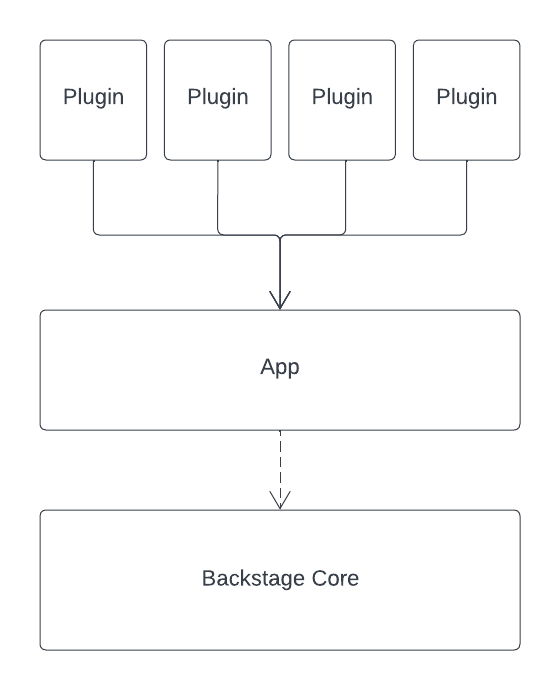
Core
- This is what the Backstage team maintains and releases as open source.
- Unless you want to contribute to the project, you may not need to wrap your head around this piece from the beginning.
App
- This app is the Developer Portal that you’ll make available to your developers.
- While adopting Backstage, you’ll be interacting the most with this piece.
Plugins
- To extend your instance’s functionality, you can install plugins into it.
- Even basic functionality is abstracted as plugins, including the Catalog. So you’ll always be working with a handful of plugins.
- There are a few dozen community plugins available to integrate popular services. And you can create your own.
Architecture Overview
This guide explains Backstage’s architecture, comparing its frontend, backend, and plugin system to a typical web application.
Typical Web Architecture
A typical web application follows a client-server model:
- Frontend: Runs in the browser, handling UI rendering and user interactions.
- Backend: Exposes REST APIs, implements business logic, and communicates with a database.
The flow of a typical request looks like this:
sequenceDiagram
    participant Browser
    participant API_Server as Backend/API Server
    participant Database

    Browser->>API_Server: GET /products
    API_Server->>Database: Query products
    Database-->>API_Server: Product data
    API_Server-->>Browser: JSON response
    Browser->>Browser: Display product list
- Browser requests
/products - API server queries the database
- Database returns product data
- API responds with JSON
- Frontend displays the product list
Backstage Core Architecture
Backstage follows a similar architecture but with its own specific implementation:
sequenceDiagram
    participant Frontend as Backstage Frontend
    participant Backend as Backstage Backend
    participant Database

    Frontend->>Backend: GET /catalog
    Backend->>Database: Query catalog entries
    Database-->>Backend: Catalog data
    Backend-->>Frontend: JSON response
    Frontend->>Frontend: Render catalog UI
The request flow in Backstage:
- Frontend sends a
GETrequest to the backend’s/catalogendpoint - Backend plugin queries its storage (database)
- Database returns catalog entries
- Backend responds with JSON
- Frontend renders the catalog in the browser
Plugin-Based Extension
Backstage’s architecture is built around plugins, which can include both frontend and backend components:
graph TD
    subgraph "Frontend Layer"
        F[Frontend Plugin]
    end

    subgraph "Backend Layer"
        B[Backend Plugin]
        DB[(Database)]
    end

    F -->|Requests /catalog| B
    B -->|Queries| DB
    DB -->|Returns data| B
    B -->|JSON response| F
    F -->|Displays| F
The plugin architecture allows for:
- Frontend requests
/catalog - Backend plugin queries its database
- Storage returns catalog entries
- Backend sends JSON response
- Frontend displays the catalog
Plugin URLs and Navigation
Each plugin in Backstage has its own URL path. For example:
- The Catalog plugin is accessible at
/catalog - The Lighthouse plugin is accessible at
/lighthouse
These URLs are defined by the plugin’s frontend configuration and are served by the Backstage app.
Monorepo Structure
Backstage uses a monorepo structure to organize its codebase:
graph LR
    subgraph "Backstage Monorepo"
        ROOT[Root Directory]

        subgraph "packages/"
            APP[app/ - Frontend React App]
            BACKEND[backend/ - Node.js Backend]
        end

        ROOT --> packages
        packages --> APP
        packages --> BACKEND
    end

    style ROOT fill:#f9f,stroke:#333
    style APP fill:#bbf,stroke:#333
    style BACKEND fill:#bff,stroke:#333
The structure includes:
packages/app: Frontend application (React)packages/backend: Backend service (Node.js)
This monorepo approach allows you to develop, test, and deploy each part independently while keeping both frontend and backend in a single repository for consistent versioning.
Frontend with React
The Backstage frontend is built using React. Here’s an example of a simple component:
1
2
3
4
5
6
7
8
9
10
11
12
13
14
15
16
import React from 'react';

export const Button = () => {
  const handleClick = () => {
    alert('Button clicked!');
  };

  return (
    <div>
      <h1>Don't Click The Button!!!</h1>
      <button onClick={handleClick}>
        Click Me
      </button>
    </div>
  );
};
And here’s how it can be used in another component:
1
2
3
4
5
6
7
8
9
10
import React from 'react';
import { Button } from './Button';

export const MyForm = () => (
  <div>
    <input id="login" type="text" />
    <input id="password" type="password" />
    <Button />
  </div>
);
Design System with Material-UI
Backstage uses Material-UI (MUI) as its design system, providing a consistent and component-driven UI experience. This ensures visual consistency across all plugins and features.
Summary
Key takeaways about Backstage’s architecture:
- Backstage features are implemented as modular plugins (frontend + optional backend)
- The project is organized as a monorepo with
appandbackendpackages - The frontend leverages React and Material-UI for a consistent, component-driven UI
- The architecture follows a client-server model with clear separation between frontend and backend
- Plugins can extend functionality without modifying the core system